Bring on the Band
This month we release full tab notation and drum kit notation into QuickStave. Read all about how we integrate these new features to make editing seamless.
Guitar tablature and drum kit notation are now live in QuickStave — both free, both fully integrated into the same editing workflow as everything else.
This isn’t a bolt-on. You open the Instruments panel, add a guitar or drum kit, and start writing. Same keyboard shortcuts, same palette tabs, same undo/redo. The whole point was that these shouldn’t feel like separate features — they should feel like the editor you already know, just with different staves.
Tablature
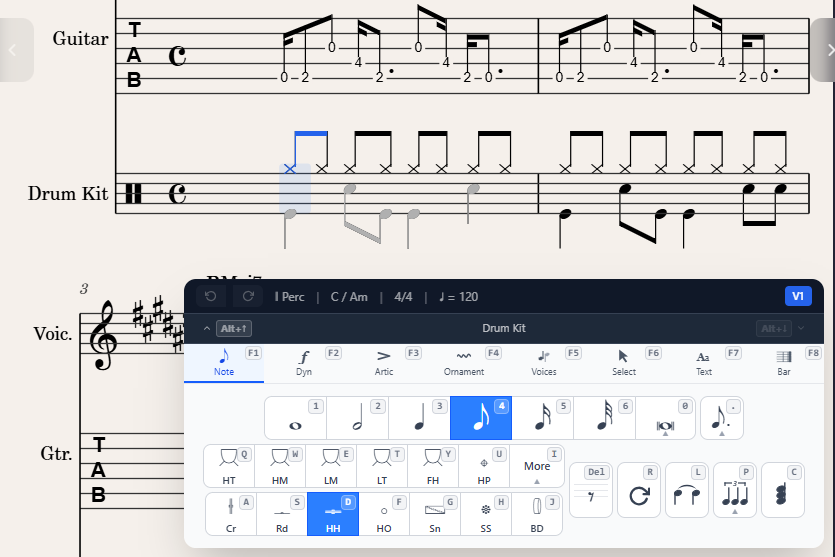
Guitar tab in QuickStave works the way you’d expect if you’ve ever used Guitar Pro or Dorico: a TAB staff shows fret numbers on strings, optionally linked to a standard notation staff above. The linked mode keeps both staves in perfect sync — edit one and the other updates.
Duration works the same as standard notation — number keys set it, sticky applies to subsequent entries. There’s no mode switch, no “TAB input mode” versus “standard mode.” It’s just the same editor with different glyphs. The only difference is Up/Down behaviour doesn’t change pitch, it moves the note to the next string.
What’s included
- 4 to 12 strings, any tuning you want (standard, drop-D, DADGAD, open G, whatever)
- Capo support — fret numbers adjust automatically
- Rhythmic TAB (stems and beams) or simple TAB (fret numbers only)
- Linked notation+TAB or TAB-only display
- Guitar techniques: hammer-on, pull-off, slides, bends, vibrato, palm mute, let ring, harmonics
- Full MusicXML round-trip — import from MuseScore or Guitar Pro exports, export back out
Custom tuning is free
This one matters. Flat.io charges for custom tuning on their paid tier. We don’t. Custom tuning, capo, and string count are all free — because they’re part of creation, and creation is always free in QuickStave. You shouldn’t have to pay to write in open-C tuning.
The tuning editor lives inside the Instruments panel. Select your guitar part, expand the staves section, and you’ll see the current tuning laid out as a list of open-string pitches. Change any of them, hit apply, done.
Drum kit
Drum kit notation uses a 5-line percussion staff with different notehead shapes for different instruments. Kick on the bottom space, snare on the third line, hi-hat on top with an x-head, toms spread across the remaining positions. Standard stuff.
The interesting part is the input. We added a DrumPad — a grid of buttons mapped to the keyboard, one per instrument in the kit. Press the key, get the sound on the correct line with the correct notehead. Same A S D F G H J row you already know for pitched notes, just mapped to kick, snare, hi-hat, etc.
How they fit into the workflow
The thing I kept coming back to during development was: does this feel like the same app? If I add a drum kit part to my band arrangement, do I have to learn a new interface? The answer should be no.
So:
- You add instruments from the same Instruments panel (
Ctrl+I) - You enter notes from the same palette (
F1tab) - Duration works identically (number keys, sticky, overwrite)
- Articulations and dynamics apply the same way (
F2,F3) - Playback just works — hit Space and hear everything together
- Export includes TAB and drums in the MusicXML/MIDI/PDF
The only new UI element is the DrumPad (which replaces the piano keys when a percussion staff is focused) and the string navigation for TAB. Everything else is reuse.
What’s next
These two features complete the “band” picture — you can now write for voice, piano, guitar, bass, and drums in a single score. All free. All in the browser. An arrangement that would have required Guitar Pro and Sibelius and a MIDI drum editor now lives in one place.
Next up: part extraction. A conductor or band leader creates the full score, and each player gets a link to just their part. No PDF extraction, no separate files — a URL with a query parameter that shows the right staves, complete with multi-measure rests. More on that soon.
— John Quick