Every Shortcut on Screen: How QuickStave Turns You Into a Power User
Inspired by Sibelius's legendary numeric keypad, QuickStave takes always-visible keyboard shortcuts to their logical conclusion — so you never need a cheat sheet.
One of the things I always loved about Sibelius was its numeric keypad display. A small on-screen replica of the keyboard’s number pad showed you exactly which key mapped to which duration, articulation, or accidental. It was a quiet bit of genius: instead of memorising shortcuts from a manual, you just looked at the screen and pressed the key. Within a few days you stopped looking. Within a week you were a power user.
That experience stuck with me for years.
The problem with hidden shortcuts
Most software buries its keyboard shortcuts. You might discover them by hovering over a tooltip, hunting through a preferences panel, or printing out a cheat sheet that lives next to your monitor until it curls at the edges and falls behind the desk.
This is a solved problem — we just stopped solving it. Sibelius proved that if you make shortcuts visible, people learn them without trying. The feedback loop is instant: see the key, press the key, hear the result. No memorisation required.
Taking it to its logical conclusion
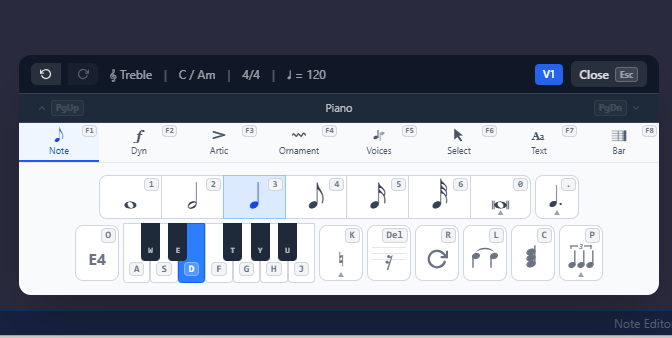
When I designed QuickStave, I wanted to take the Sibelius philosophy further. On PC, every keyboard shortcut is visible on screen at all times. Not just note input — navigation, articulations, dynamics, ornaments, the lot.
Every palette button shows its shortcut key directly on the control. There’s no hidden layer. You’re constantly given feedback on what key to press, and the muscle memory builds itself. You never need to consult a cheat sheet, a manual, or online help to know how to navigate the system quickly.
Why this matters
Music notation is dense. A full-featured editor has hundreds of possible actions: durations, accidentals, articulations, dynamics, clefs, key signatures, time signatures, ties, slurs, tuplets, tremolos, ornaments, and more. If even a fraction of those shortcuts are invisible, the learning curve gets steep fast.
By keeping every shortcut on screen:
- Discovery is instant — you see what’s possible without searching
- Learning is passive — your eye catches the shortcut every time you click, so you naturally start pressing the key instead
- Confidence grows quickly — there’s no anxiety about “am I doing this the slow way?”
- The interface is the documentation — nothing is hidden behind a help menu
Designed for flow
The goal is to keep you in a state of flow. Every time you have to stop writing music to look something up, you lose momentum. QuickStave is designed so that the answer is always already in front of you — right there on the button you were about to click.
It’s a small design choice, but it changes the way you work. And it’s one of the things I’m most proud of.
— John Quick