Playing Notes In: MIDI Keyboard Support
QuickStave now takes note input from a MIDI keyboard or drum pad — step-time entry straight onto the staff, in the browser, with no plugin and no install.
MIDI keyboard input is now live in QuickStave. Plug in a controller, play a note, and it lands on the staff at your cursor. Free, in the browser, with nothing to install and no plugin to authorise.
This isn’t a separate mode. A played note goes through exactly the same entry path as a typed one, which means everything you already know still applies — the duration on the palette, sticky dots, undo, live collaboration, part extraction, MusicXML export. You aren’t entering notes a different way. You’re pressing a different key.
Getting connected
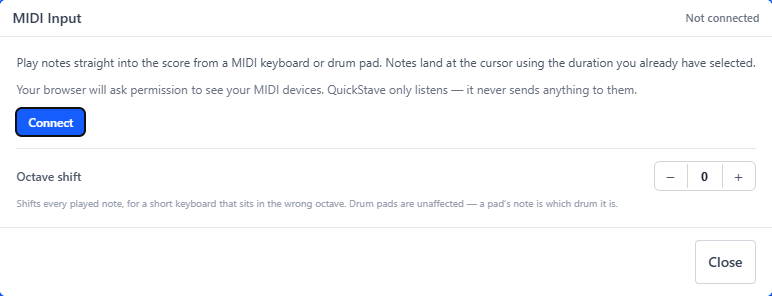
Open the MIDI panel from the MIDI pill above the score, with Alt+M, or
by searching “MIDI” in the command palette (^K).
Press Connect. Your browser will ask whether QuickStave may see your MIDI devices — say yes. Your controller appears in the panel, you select it, and that’s the setup done. Next time you come back it reconnects on its own.
If you have more than one device attached, pick the one you want from the list. That choice is remembered on that computer.
What comes from where
This is the part worth understanding, and it takes about ten seconds. The keyboard supplies the pitch. Everything else comes from the palette, exactly as it does when you type:
- Duration is whatever is selected on the Note palette. Press
3for a quarter note and every note you play is a quarter note. Holding a key down longer doesn’t make a longer note — set the duration, then play. - Accidentals are spelled to your key signature. A black key in D major is
written as the sharp that key calls for. Press
Kif you want the enharmonic instead. - Notes land on the staff and voice your cursor is in. A chord spanning both hands on a grand staff goes onto the staff you’re working in, rather than being split between them.
- Dynamics come from the Dynamics palette (
F2), not from how hard you play. Dynamics are notation, and a marking says exactly what you mean.
The rest you’d expect simply works, because it’s the same entry path: tablature gets its string and fret assigned automatically, transposing parts convert between concert and written pitch, and accidentals respell to match what you’ve already written in the bar.
Chords
Play the notes together and they stack into one chord. There’s no mode to turn on — a hand sends three keys at once where a computer keyboard can only manage one at a time, so QuickStave groups what arrives together.
For a chord you’d rather not play all at once, there are two ways to hold it open.
The sustain pedal. Hold it down, play as many notes as you like, and they all stack onto the same chord. Release it and the cursor moves on. It’s what your foot is already doing while you work out a voicing, so it seemed obvious that QuickStave should be listening.
Chord mode (M). The same toggle that stacks typed notes works for played
ones. While it’s on, every note you play stacks onto the current beat however
slowly you play it, which is how you enter a chord too wide to reach with one
hand.
The panel shows pedal held in its header while your foot is down, so you can always see which of the two is in charge.
Drum kits
On a percussion staff a pad’s MIDI note is the instrument — 36 is a kick, 38 a snare — so QuickStave looks it up in the kit rather than treating it as a pitch. Hit the pad, get the right notehead on the right line. If your controller sends a pad that isn’t in the kit, nothing is entered rather than a guess.
Short keyboards
If you have a 25- or 32-key controller sitting an octave below where you want to write, there’s an octave shift in the panel — up or down three octaves. It applies to everything you play and is remembered per browser. Drum pads are unaffected, since a pad number is which drum it is, not how high it sounds.
Where it works
MIDI input needs the Web MIDI API, which Chrome, Edge and Android Chrome all support. Safari and iOS don’t support it at all. That isn’t something QuickStave can work around, so on those browsers the MIDI button simply isn’t there rather than sitting among the others doing nothing.
What’s next
This release is step-time entry: one note or chord at a time, at your own pace, with the duration set on the palette. It’s how most people actually enter notes, and it’s precise — what you play is what you get.
Real-time recording is what we’re working on now. Play a part at tempo against a metronome and have QuickStave transcribe the rhythm as well as the pitches. That’s a harder problem than it sounds — quantisation, tempo tracking, and working out what a slightly early note was meant to be — which is exactly why step-time comes first. More on that soon.
— John Quick