Free · No Ads · No Sign-up
A virtual piano that plays
up to four instruments at once.
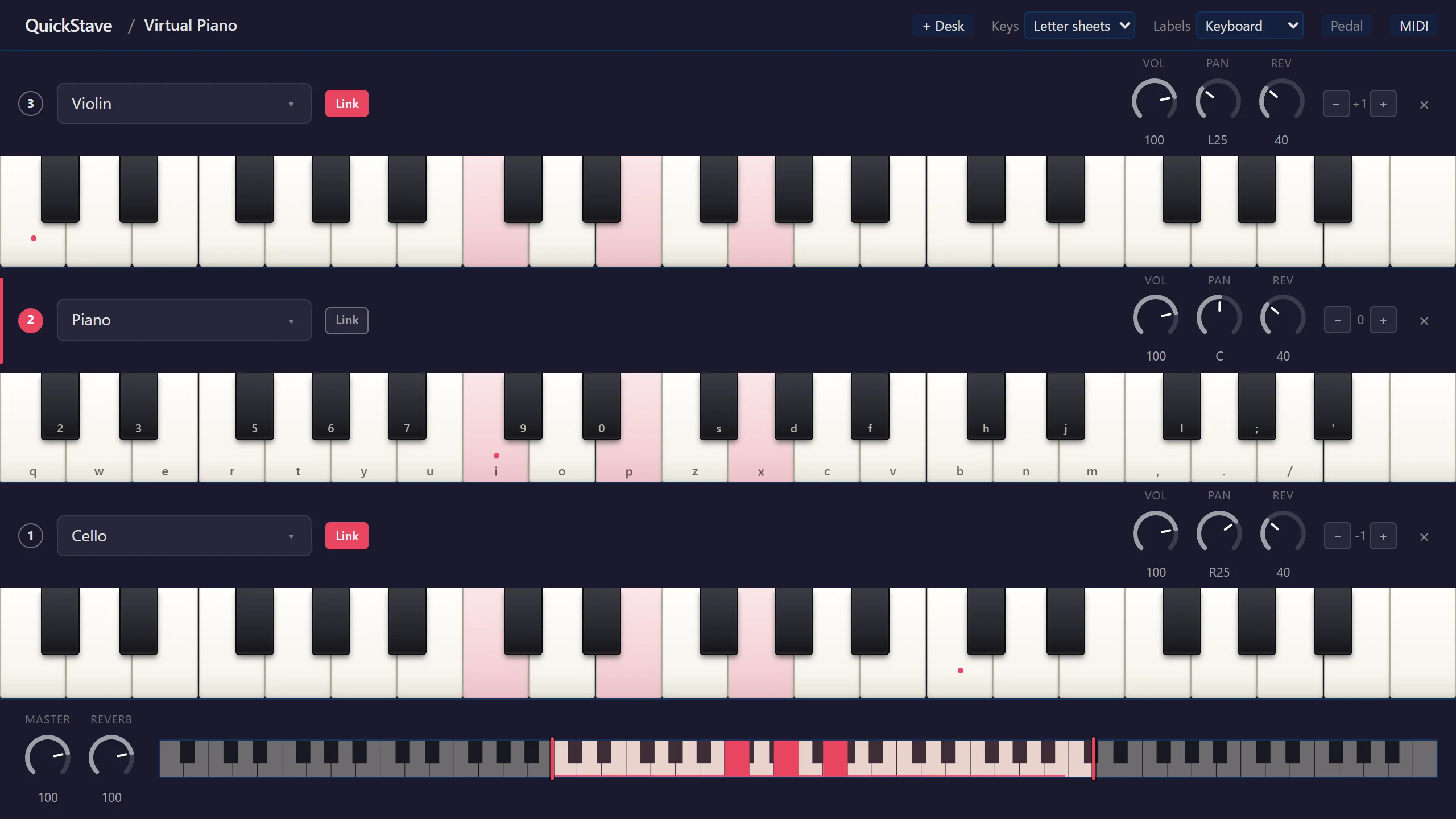
Play with your computer keyboard, a MIDI keyboard or your fingers. Stack a piano, strings and drums, link them, and one key plays them all — octaves included.
Play in three steps
Open it and play
Press the keys on your computer keyboard — i is middle C
— or tap and slide across the keys on screen. A MIDI keyboard plugs
straight in.
Add instruments
Stack up to four keyboards and give each its own sound, from grand
piano to cello to drum kit. Press F1–F4,
or tap one, to play it.
Link them
Switch on Link and a keyboard plays along with whichever one you play. Set it an octave up and every key becomes an octave.
More than one instrument at a time
Most online pianos play one sound at a time. This one plays up to four together, and lets you balance them like a band.
| QuickStave | Typical online pianos | |
|---|---|---|
| Instruments from one keypress | Up to four, live | One |
| Volume, pan and reverb per instrument, live | On every keyboard | Not found |
| Choose the keys on screen | Any range, with two drag handles | Octave shift or fixed views |
| When you want to write it down | A full music notation editor, same app | Letter sheets |
Compared with five popular browser pianos, checked September 2026.
Everything you need to play
Letter-sheet layout
The key layout virtual piano letter sheets are written for, with every key labelled on screen. Prefer a music program's layout? Pick DAW instead.
Up to four instruments
Each keyboard has its own sound and its own octave. Play them one at a time, or two hands on two keyboards on a tablet.
Link and layer
Linked keyboards play together from one key: piano over strings, a bass doubling your left hand, or octaves across the whole range.
A real drum kit
Turn any keyboard into drum pads, labelled with standard drum notation symbols, and play them from your keys or your fingers.
A mixer for every instrument
Volume, pan and reverb on each keyboard, plus a master — so a layered sound sits the way you want it.
MIDI keyboard and pedal
Connect a MIDI keyboard and sustain pedal in browsers with Web MIDI. The space bar is a pedal too.
Phone and tablet ready
Multi-touch and glissando on any touch screen. On a phone, two keyboards an octave apart give you two octaves at once.
Keys, notes or solfège
Label the keys with your computer keys, note names or do-re-mi — or hide the labels and just play.
Free, and remembers you
No account and no install. Your instruments, links and mixer are still there the next time you open it.
Frequently asked questions
Is the virtual piano free?
Yes. It is free to play, with no ads, no account, no sign-up and nothing to install. Open it in a browser tab and start playing.
Can I play the virtual piano with my computer keyboard?
Yes. The letter keys and the number row play the notes, with the i key as middle C, and the space bar is the sustain pedal. Every key is labelled on screen, and you can switch the labels to note names or solfège instead.
Does it work with virtual piano letter sheets?
Yes. It uses the same key layout that popular virtual piano letter sheets are written for, so a sheet you already play from works as written. If you are used to a music program's keyboard layout instead, there is a DAW layout too.
Can I play more than one instrument at the same time?
Yes. Stack up to four instruments, each on its own keyboard, and play any of them — or link them, so one key sounds every linked instrument at once. A piano with strings underneath, or a bass line doubling your left hand, is one keypress.
How do I play octaves with one key?
Add a second keyboard, move it up an octave, and link it. Every key you press now plays itself and the octave above. It works with any two instruments, and with three or four for wider doublings.
Can I connect a MIDI keyboard?
Yes, in browsers that support Web MIDI, such as Chrome, Edge and Firefox. Connect from the MIDI button at the top of the page; your keyboard plays whichever instrument is in focus, and anything linked to it. A MIDI sustain pedal works too.
Does the virtual piano work on a phone or tablet?
Yes. Play with several fingers at once, and slide across the keys for a glissando. On a phone, set two keyboards an octave apart to play two octaves at once, one above the other.
Is there a drum kit?
Yes. Choose Drum Kit on any keyboard and it becomes a set of drum pads you can tap or play from your computer keys, alongside your other instruments.
What instruments can I play?
Over 100: pianos, organs, strings, brass, woodwinds, guitars, percussion and more — the same instrument sounds QuickStave's music notation editor uses for playback.
Start playing
It's free, it runs in your browser, and it's ready the moment it opens.