Meet the Virtual Piano: Four Instruments, One Keyboard
QuickStave now has a free virtual piano — play any instrument in our library from your computer keyboard, your screen or a MIDI keyboard, and stack up to four of them to play together from one key.
QuickStave has a new instrument, and this one you play. The virtual piano puts every sound in our library under your fingers — piano, strings, brass, organ, drums and the rest — playable from your computer keyboard, your touchscreen or a MIDI keyboard. It’s free, it runs in the browser, and there’s no account to make.
Open it from the new Piano button on your scores page, or press K there.
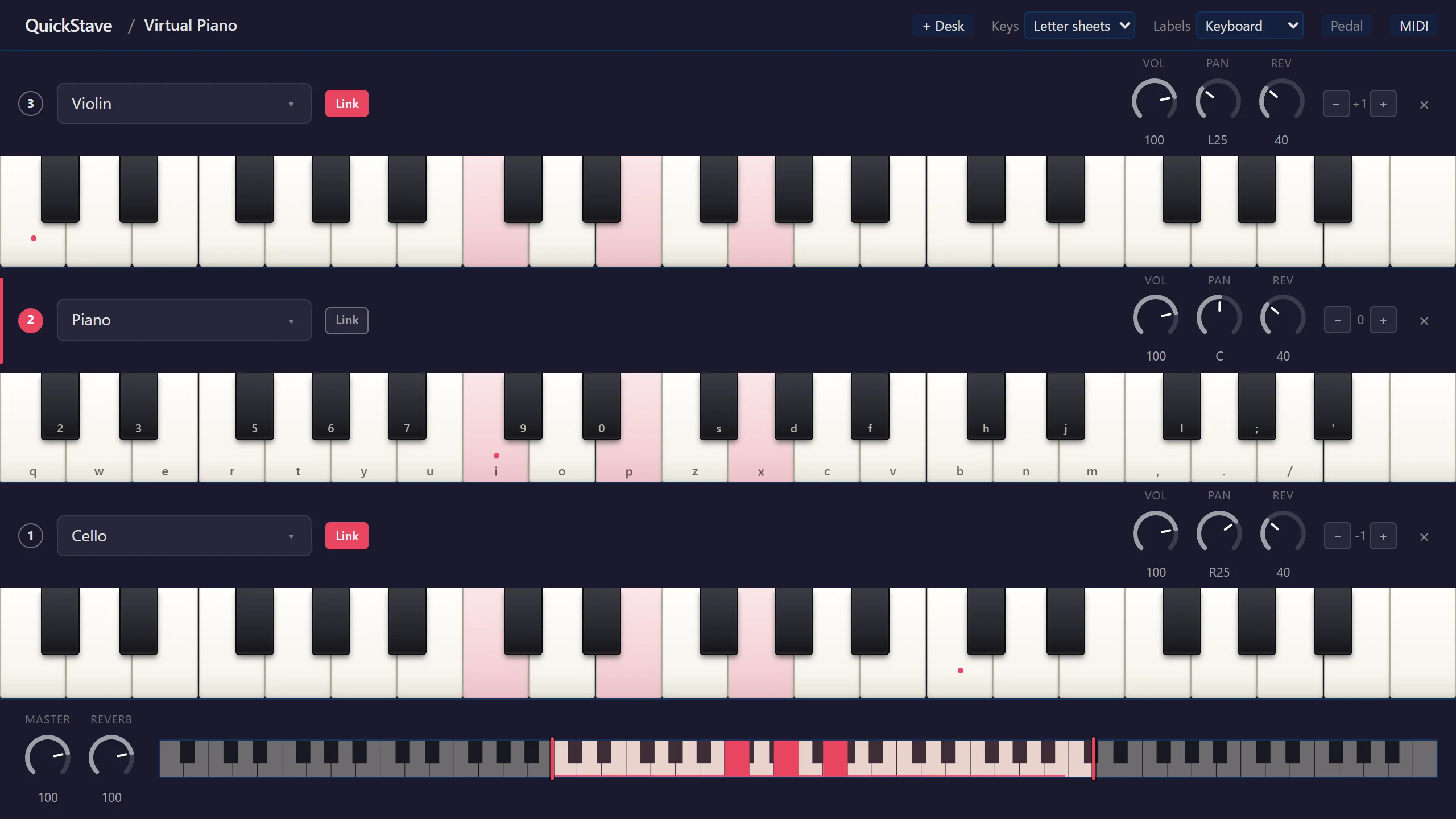
Your keyboard is the piano
The rows of your computer keyboard become the keys of a piano: a row of letters for the white notes, and the row above it for the black notes, sitting in the gaps exactly where a piano has them.
There are two layouts to choose from. Letter sheets matches the layout used by the huge library of letter-notation music sheets already published online, so the songs you find there play here exactly as written. DAW is the layout music software uses, with two rows an octave apart for playing with both hands.
Each key on screen shows the key to press. You can switch the labels to note names or solfège, or turn them off and play by ear.
Four instruments at once
Each keyboard on the page is a desk, and you can stack up to four. Give each
desk its own instrument, its own octave and its own stretch of the 88 keys, then
switch between them with F1 to F4.
The fun starts with Link. Link a desk and it plays along with whichever desk you’re playing. Put strings under a piano and every note you play is both. Set a linked desk an octave up and one finger plays octaves. Link a cello an octave down and a violin an octave up around a piano, and a single key fills the room.
Every desk has its own volume, pan and reverb, so you can place the cello on the left, the violin on the right and the piano in the middle, and balance them while you play.
Drums, pedal and MIDI
Choose a drum kit and the desk turns into a grid of pads, laid out just like the
keys on your keyboard, each one labelled with its key. Hold Space for the
sustain pedal. And if you have a MIDI keyboard, press MIDI to plug it in:
how hard you play sets how loud each note sounds, and the pedal on your keyboard
works too.
On a phone or tablet, the piano fits the screen, desk controls tuck behind a button, and you play by touching the keys. The nearer the front of the key you touch, the louder the note.
Just as you left it
Your desks, instruments, links and mix are remembered in your browser, so the next time you open the piano it’s exactly as you set it up. The same sounds play your scores, so the instrument you like on the piano sounds just the same in your arrangements.
The virtual piano guide covers every control, and the virtual piano page has the full tour. Or skip straight to it and start playing.
— John Quick