Articulations, fermatas, and breath marks
Staccato, accent, and the rest of the F3 direct-toggle cluster apply with one keypress — no end point to pick, unlike a spanner.
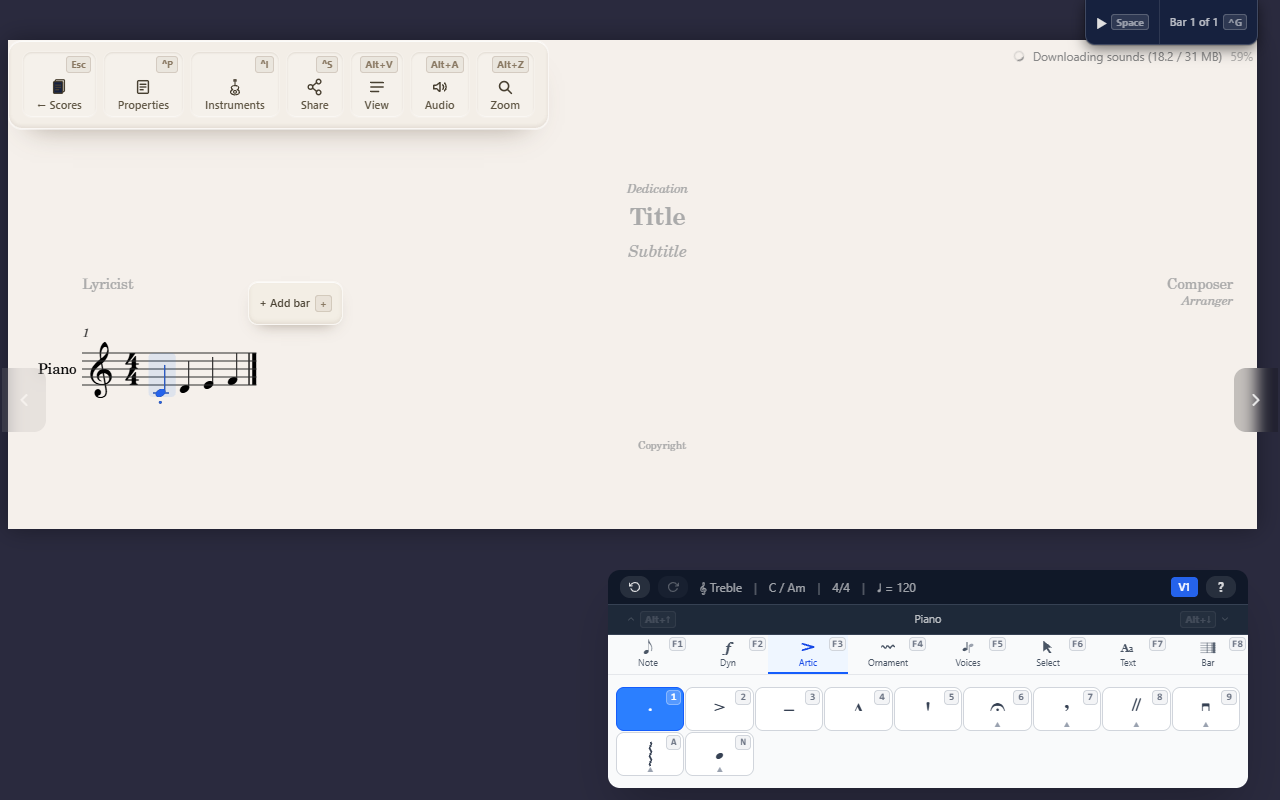
The Articulations tab (F3) is mostly a direct-toggle cluster: press a
key, done — no end point to pick, unlike a spanner (see Creating
spanners for the contrast).
Direct toggles
Keys 1–5 apply staccato, accent, tenuto, marcato, and staccatissimo to
the selected note or notes. Each is an independent toggle — applying one
doesn’t clear another already on the same note.
Fermata, breath mark, and caesura
Three submenus hold marks that apply to a moment rather than one note specifically:
- Fermata (
6) — 5 variants (Normal, Short, Long, Very long, Square); valid on a rest as well as a note, since a fermata holds a moment, not a pitch. HoldShiftfor the inverted (below-staff) form. - Breath mark (
7) — Comma, Tick, or Salzedo, placed after the selected note. - Caesura (
8) — Normal, Thick, Short, or Curved, marking a brief silence between notes.
Arpeggio
A opens Standard, Up, Down, or Non-arpeggiate — rolls a selected chord
rather than a single note.
Flipping above or below the staff
X moves every articulation on the selected note to the other side of
the staff — they’re stacked as one group, so there’s no picking one to
flip and leaving the rest. Press X again to hand the group back to
whichever side the engine would have chosen (usually the side opposite
the stem), rather than pinning the opposite one: a group only carries
your override while you actually disagree with that choice. Select a
range first and X flips every note’s group the range covers, each from
its own side.
Clearing
Reapplying an articulation that’s already there removes it — press its
key a second time. To remove every mark on a note in one step, search
“Clear articulations” in the command palette (^K) — it no longer has
its own keyboard shortcut, since X now flips.
Tips
- These marks stack independently — applying one doesn’t clear another already on the same note.