Adding technique text
F7 K adds upright instrument-action text like pizz. or arco — techniques form cancel-pairs and can change MIDI program, octave, velocity, and duration on playback.
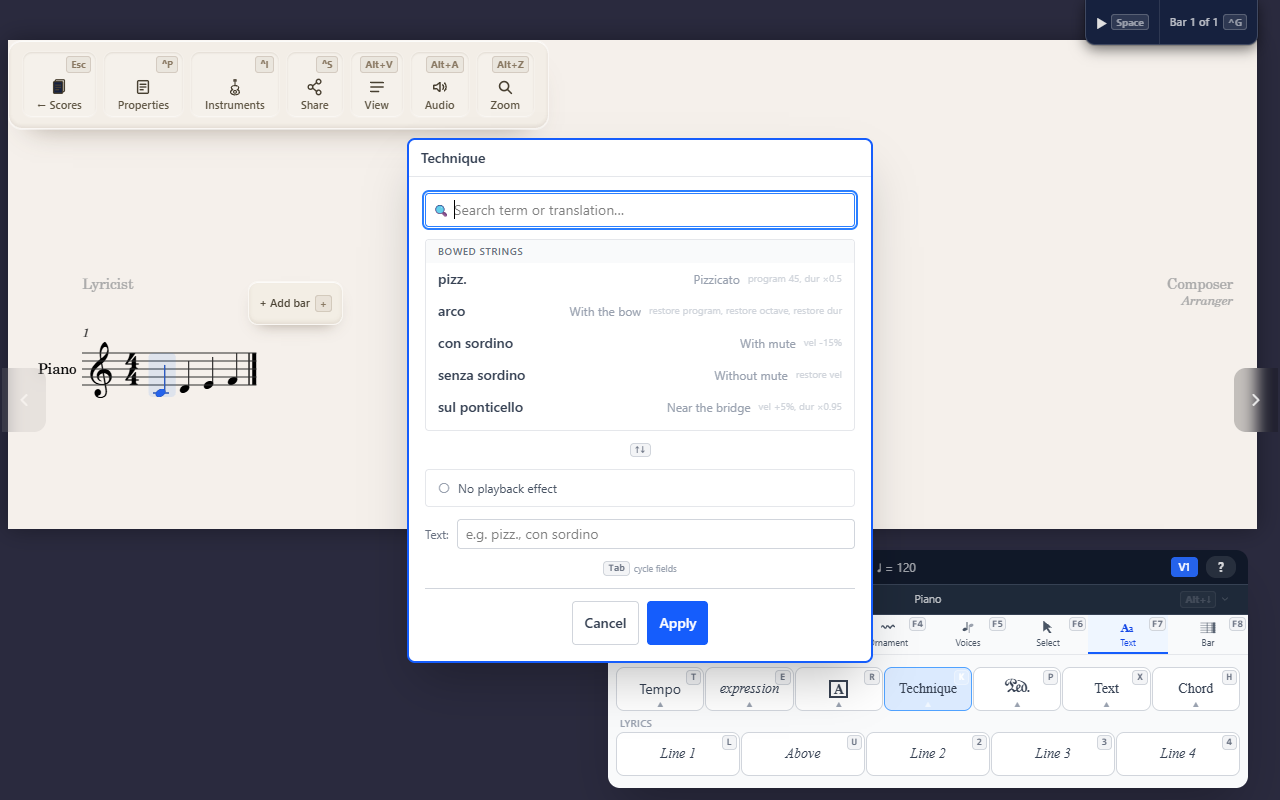
F7 K (Text tab) attaches instrument-action text — pizz., arco, con
sordino — in an upright (roman) font, distinct from expression text’s
italic.
A searchable library, grouped by instrument family
The picker is grouped by instrument family (bowed strings, brass, woodwind, keyboard, and a general set) so you’re not scrolling through techniques that don’t apply to the current part.
Techniques cancel each other on playback
Techniques form cancel-pairs tracked as real playback state — e.g. arco cancels a preceding pizz., restoring normal bowing. Behind the scenes each technique can change the MIDI program, octave shift, velocity, and duration used for playback from that point forward, and a canceling technique restores whichever of those it affects back to normal, rather than needing you to explicitly undo the earlier one.
Tips
- Reach for technique text for a physical playing instruction (pizz., arco, mute) — compare Adding expression text for a mood/dynamic instruction (dolce, cantabile), which uses italics and a different effect model.