Using different notehead shapes
F3 N swaps a note's head between 10 shapes — X, diamond, triangle, slash, and more — for percussion cues, harmonics, slash charts, and silent counting.
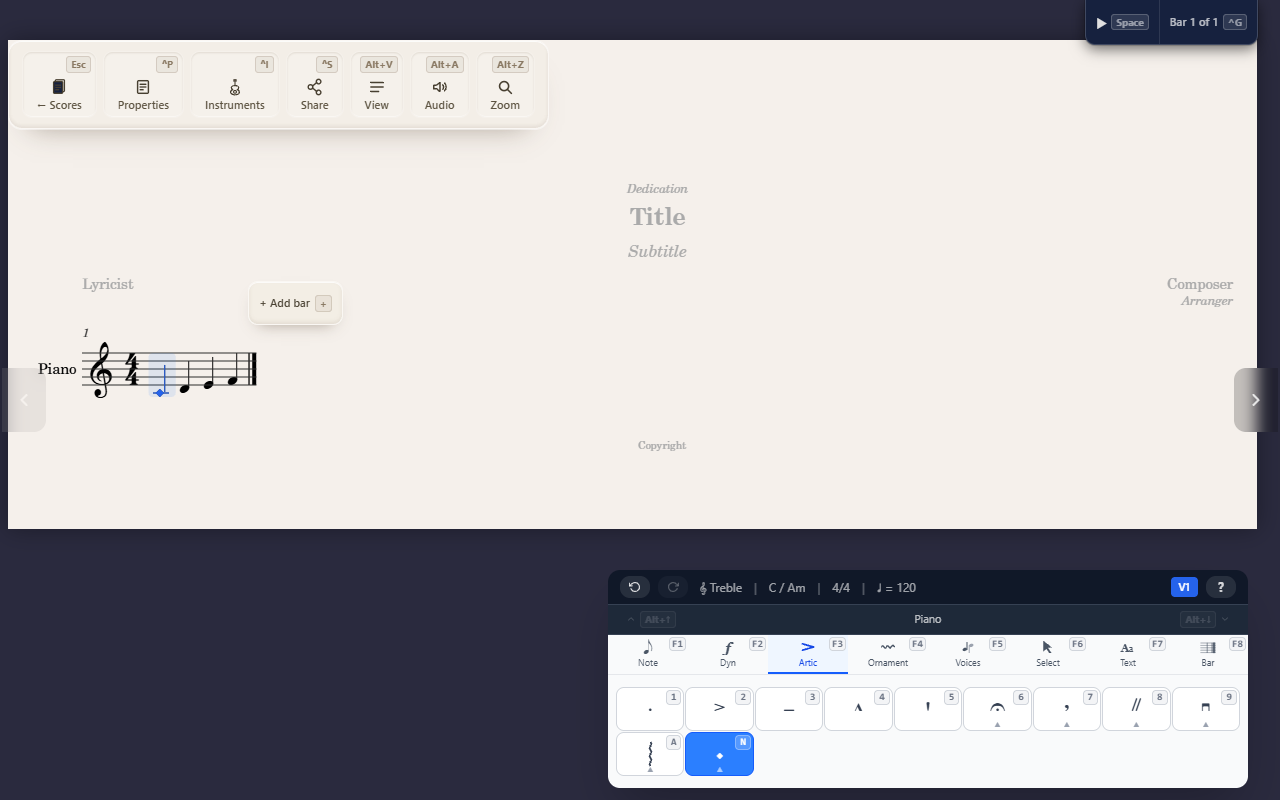
F3 N (Articulations tab) replaces the selected note’s head shape with one
of ten alternatives — a purely visual change, the pitch and duration
underneath are unaffected.
The ten shapes
0–9: Normal, X, Diamond, Triangle, Slash, Circle-X, Square, Cross,
Inverted triangle, None.
Why you’d reach for one
Each non-normal shape has a real notation convention behind it:
- X — percussion cues (hi-hat, cymbal), or a “dead”/ghost note with no definite pitch.
- Diamond — a natural harmonic; also common for cowbell/open hi-hat in a drum part.
- Circle-X — a pinch (artificial) harmonic.
- Triangle — another percussion-cue variant (e.g. a closed hi-hat or cowbell, depending on the part’s convention).
- Slash — slash notation, e.g. a chord-chart rhythm slot with no specific pitch shown.
- None — a silent placeholder that still occupies its beat, for spacing out a count with nothing visibly notated.
Tips
- Pick
0(Normal) to change a note back to a standard notehead. - This is purely notational — playback and pitch are unaffected by the shape you pick.