Percussion and drum kit notation
Picking a percussion preset sets the staff lines, clef and which sound sits where; the drum kit stands in its standard places, and the hi-hat's open, closed and half-open signs are heard.
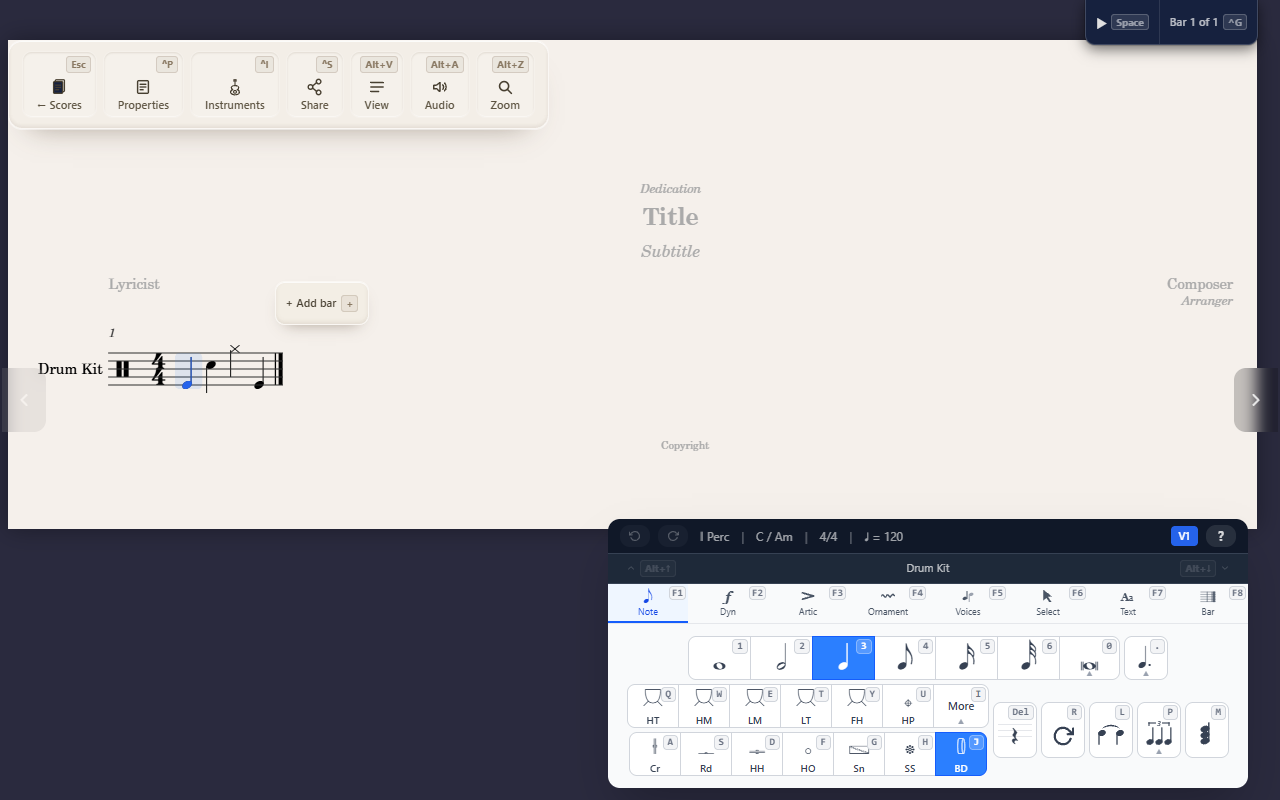
Percussion notation is set by the instrument you pick — there’s no
separate “make this a percussion staff” setting. Picking a percussion
preset in the Instruments panel (Ctrl+I) sets the staff lines, the
clef, and a percussion map (which sound sits on which line or space,
with which notehead) all at once.
One, two, three or five lines
A single-instrument preset (Snare Drum, Triangle, Woodblock, …) gives a one-line staff. Any percussion part of indefinite pitch can instead stand on two, three or five lines: the Staff lines row in the part’s settings in the Instruments panel sets the count. Fewer lines are the five-line staff’s middle lines, so changing the count moves no note.
On two and three lines the barlines run a space past the outer lines, and rests stand in the middle of the lines. A MusicXML file’s two- and three-line staves come in as they are.
The drum kit
The Drum Kit preset puts each piece in its standard place on five lines, as Elaine Gould’s Behind Bars gives them: the snare drum in the third space; the bass drum in the first space and the acoustic bass drum on the bottom line; the hi-hat a cross in the space above the staff, and its foot pedal a cross in the space below; the ride cymbal a cross on the top line and the crash cymbal a cross on the ledger line above; the toms from the top line down to the second line. Drums take normal noteheads, cymbals crosses. A kit in a score written before these places moved to them the first time the score opened, and sounds as it did.
The hi-hat
The hi-hat plays as its sign says: an o over it open, a +
closed, and the half-open sign, a circle crossed by a stroke, half
open. The three are on F3 W (see Instrument technique marks), and
the drum pad’s open hi-hat writes its o for you. An open hi-hat rings
until the next hi-hat note, a half-open one for its written value. A + on
the note an open hi-hat is tied into closes it with the foot.
Note entry
On a percussion staff the drum pad replaces the usual pitch letters (A–G): press the pad for the sound you want. Durations, dots and rests work as on any other staff (see Entering notes).
Each sound goes into the voice you’re writing. To write a kit in two
parts, cymbals with stems up and drums with stems down, enter the
cymbals, then switch to the second voice with Ctrl+2 for the drums (see
Working with multiple voices).
Letting it ring
In playback a drum or cymbal rings until the first rest after it in its voice, then stops. Notes in a row ring on together, and a tied note rings through the note it’s tied to. In the first voice an empty bar counts as a rest. Tuned percussion plays the length you write.
To let a note ring past a rest, give it an open tie with Let ring
(F3 V, see Entering notes), or write l.v. or l.v. sempre as
technique text: every note after it rings until damp (see Adding
technique text).
Rolls, rim shots and timpani
- A roll is a tremolo on the note (
F4 R, see Glissando and tremolo): with three strokes or more, counting the note’s own beams, it plays as an unmeasured roll. A roll between two drums is a chord with strokes; unmeasured, its notes play in turn, hand to hand. A trill on a drum plays as a roll. - A rim shot can take a black notehead in a circle: Circled,
F3 NthenC(see Using different notehead shapes). - A timpani glissando slurred to its end isn’t struck again at the end.
- New timpani parts start without a key signature, their sharps and flats written on the notes (see Adding and managing instruments).
The percussion map is editable
Each preset’s map is a real, editable table — the Instruments panel’s Percussion Map lets you add, remove, reorder, or reset entries (pad key, icon, name, notehead, staff position, MIDI sound) if a preset’s defaults don’t match what you’re notating. Where two sounds share a line or space, their noteheads tell them apart.
Tips
- Reach for notehead shapes directly (not through an instrument preset) when you need a percussion-style notehead — X, diamond, and so on — on a note that isn’t on a percussion staff at all, like a ghost note in a guitar part.