Repeating bars with a repeat sign
A bar-repeat sign stands for a bar, or two or four bars, played again exactly — the repeat bar holds no notes of its own and plays as the bars it repeats.
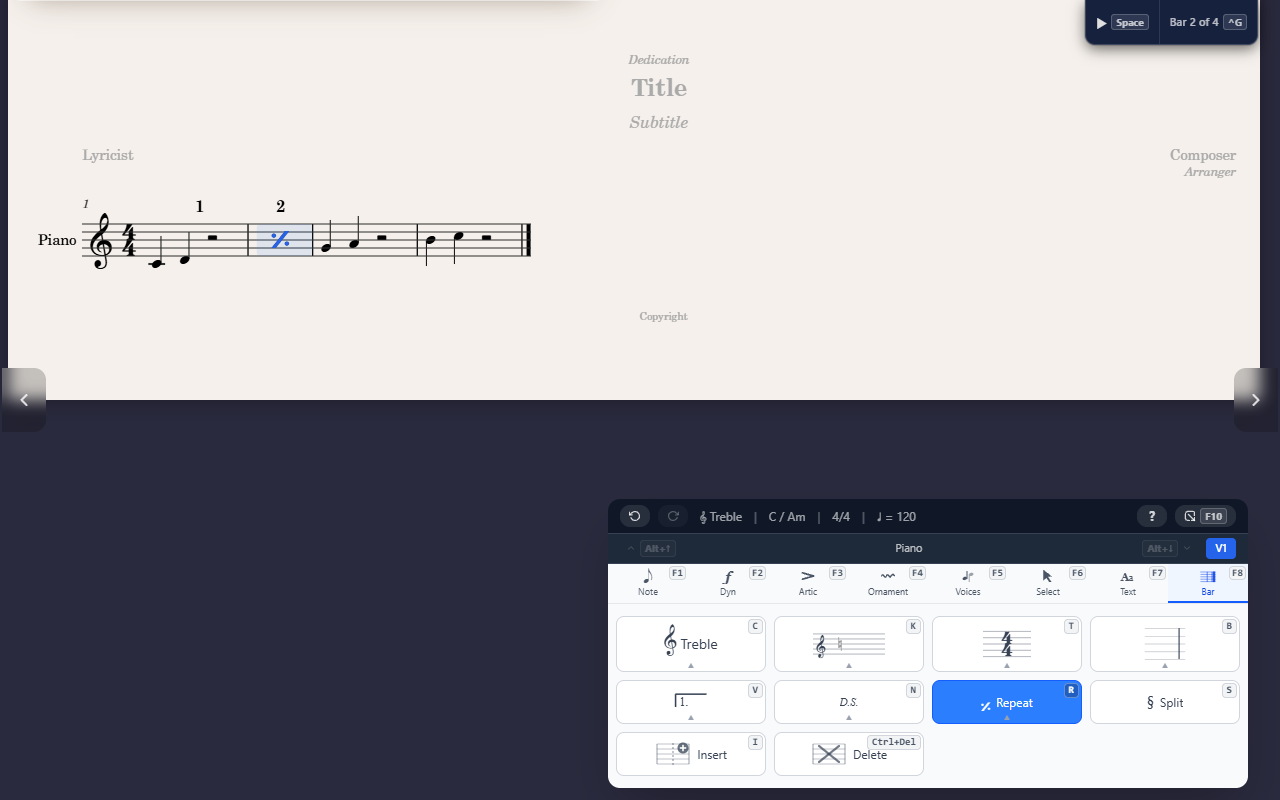
A bar-repeat sign — a slash between two dots — stands for the bar before it played again exactly. A two-bar sign stands across the barline between its two bars and repeats the two bars before them; a four-bar sign repeats the four bars before it.
Writing a repeat
F8 R opens the repeat menu on the Bar tab:
1makes the current bar a repeat of the bar before it.2makes the current bar and the next a repeat of the two bars before them.4makes four bars from the current one a repeat of the four bars before them.
With bars selected, every selected bar becomes a repeat, in groups of two or four from the first selected bar, on each selected staff.
The bars’ own notes go. A repeat bar holds no notes of its own: it plays, exports and copies as the bars it repeats, as they stand now, so changing those bars changes every repeat after them.
When a choice is greyed
A choice is greyed, with the reason beside it, where the sign can’t stand:
- there are no bars before it to repeat, or they are all rests;
- a tie or a slur runs into the bar;
- the metre changes after the bars it would repeat;
- the bars it would repeat have lyrics;
- a repeat barline, an ending or a section break would fall inside a two- or four-bar group;
- the bars are part of a two- or four-bar repeat already (write that out first).
Numbers and lines
Each repeat is numbered above the stave, counting the bars repeated as 1: a bar repeated three times reads 1, 2, 3, 4. A two- or four-bar group’s number stands over its middle barline.
When a repeat bar begins a line, it is written out in full, so the player need not look back to the line before; its number continues the count. A two- or four-bar group always stays on one line.
Writing a repeat out
F8 R Delete writes the repeat at the cursor, or the repeats in the
selection, out as the music they repeat, with the rest of a two- or four-bar
group. Typing a note into a repeat bar does the same first, then enters the
note. Deleting the sign (Delete) leaves an empty bar.
Inserting or deleting a bar before a repeat leaves it written out as the music it had, rather than repeating a different bar.
In MusicXML files
Repeat bars are exported written out, as the MusicXML standard asks, with the repeat sign marked on them. A file’s one-, two- and four-bar repeats come in as repeat bars; a repeat of any other number of bars comes in written out.