Splitting a score into sections
F8 S marks a titled heading within one continuous score — a forced system break, an optional title/subtitle, restarted bar numbering, and per-part staff visibility.
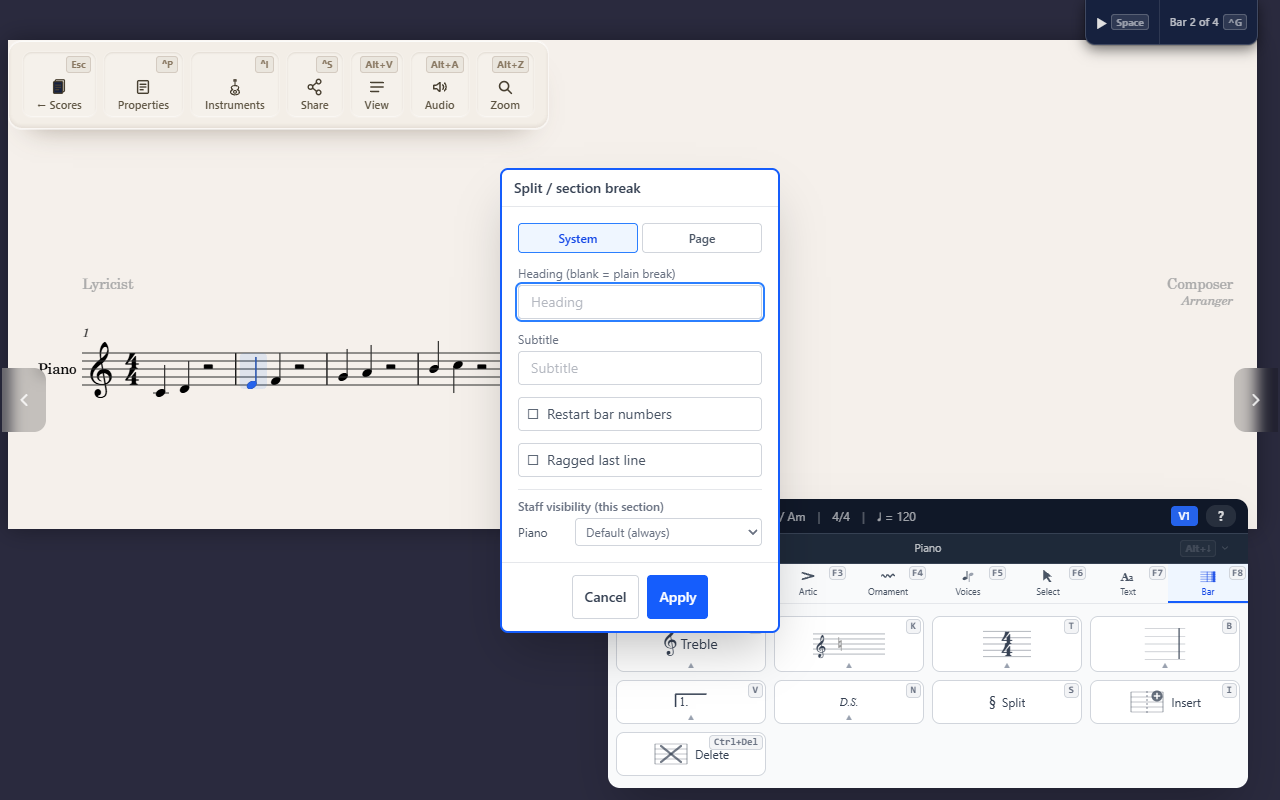
F8 S (Bar tab) marks a section at the selected measure — a titled
heading inside one continuous score, primarily for a multi-piece
collection sharing one instrument roster (a set of songs, a suite of
movements). A section is not a separate container or a break in the
score’s flow; it’s a marker on the measure where a new piece begins.
What a section sets
- A forced system or page break — a section always starts a fresh system, so it can’t sit mid-line.
- An optional printed title and subtitle.
- Restarted bar numbering, if you want the new piece to count from bar 1 again instead of continuing the running total.
- Per-part staff visibility for that section — hide a part’s staff entirely, show it only on the section’s first system, or show it only when it has something in it.
Clef, key, and time still carry forward
A section boundary doesn’t reset the clef, key signature, or time signature — whatever was in effect keeps applying afterward, the same as anywhere else in the score. It’s simply a good place to restate one explicitly if the new piece calls for it, not something QuickStave does for you automatically.
Removing breaks
To remove one bar’s break, open F8 S on that bar and choose
Remove.
With two or more bars selected, F8 S opens Remove breaks instead.
It counts the line and page breaks on the selected bars, and Remove
takes them all out in one step, so the bars flow onto lines as they fit.
The first selected bar’s break goes too, as it does on its own; the line
after the selection still starts where it did. Section headings are kept
unless you tick Remove section headings too. Select the whole score with Ctrl+A to clear every break
in it; one undo brings them all back.
Tips
- Playback ignores sections entirely — they’re a layout/print concept only, with no inserted silence or timing shift.
- Use Jumping to a measure to move straight to a named section once you’ve added a few.