Changing clef mid-score
A clef change is a normal, fully-supported mid-score edit — the new clef stays active on that staff from that point forward until the next explicit change.
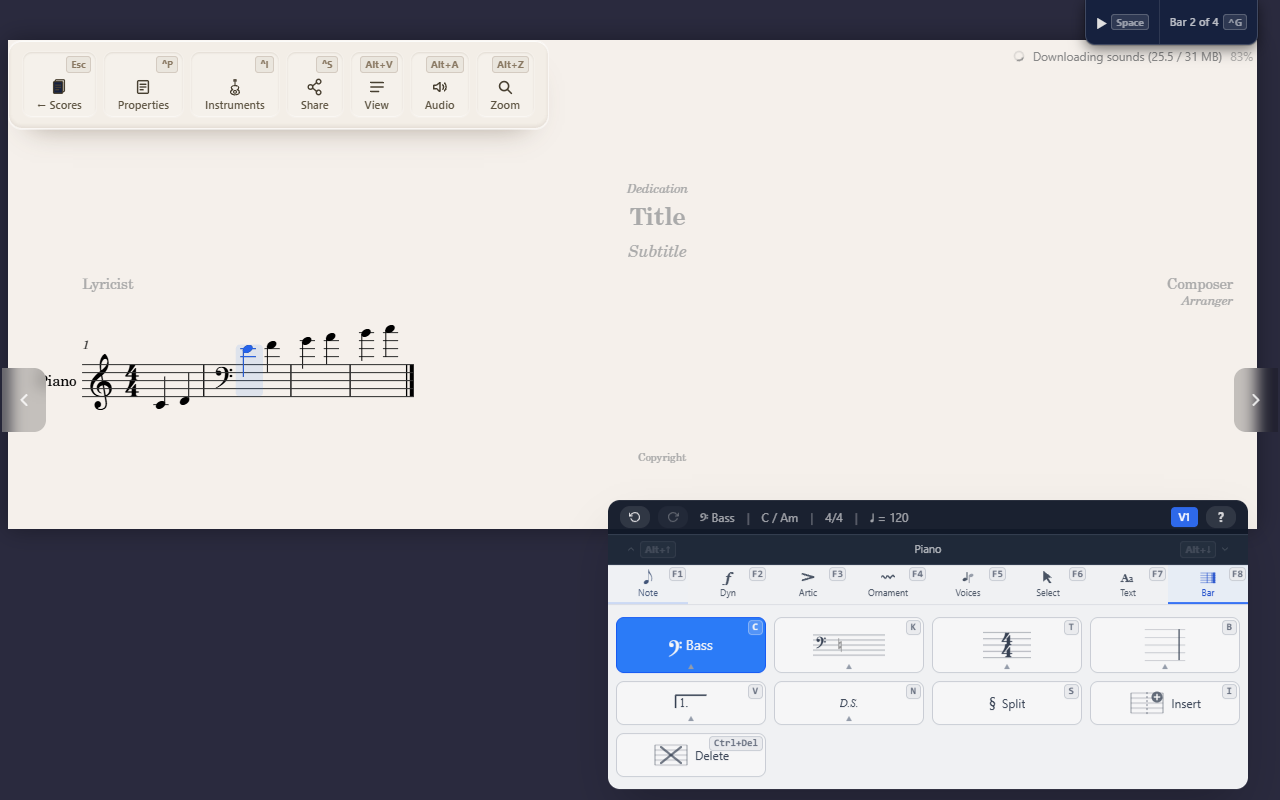
Changing clef partway through a score is the normal case, not a special one — select a measure and set a new clef, and it stays active on that staff from there forward until the next explicit change.
Changing clef
Select a measure and open the Bar tab’s clef submenu with F8 C, then a
digit:
1— Treble2— Treble 8vb3— Treble 8va4— Bass5— Bass 8vb6— Alto7— Tenor8— Percussion
Where the new clef appears
A clef change that starts a measure is drawn at the end of the measure before, just ahead of the barline, a little smaller than the clef at the start of a line. Next to repeat signs it goes where it applies: after a start-repeat barline it stays after the barline, and at an end-repeat it goes before the barline only when the new clef is also the one in force where the repeat goes back to.
What “mid-score” means here
A clef change is scoped to the staff and voice it’s applied to — other staves in the same part (or other parts entirely) keep whatever clef they already had. The new clef reads forward from that measure until you explicitly change it again; nothing resets it automatically at a section or line break.
Tips
F8 Ccovers the everyday clefs. A staff can also open with the Soprano, Mezzo-soprano or Baritone C clef, the French violin clef, or the Baritone F or Sub-bass clef: choose it from that staff’s clef list in the Instruments panel (Ctrl+I). Imported scores keep these clefs.- Treble 8vb, Treble 8va and Bass 8vb shift what octave the written clef sounds at (a tenor voice reading a treble clef an octave down, for instance) — they’re a distinct clef, not a treble/bass clef plus a separate octave marking.
- Time and key signature changes work the same “active from this point forward” way — see Changing time and key signature.