Changing time and key signature
F8 T opens the time signature picker and F8 K opens the key signature circle of fifths — both apply from the selected measure forward.
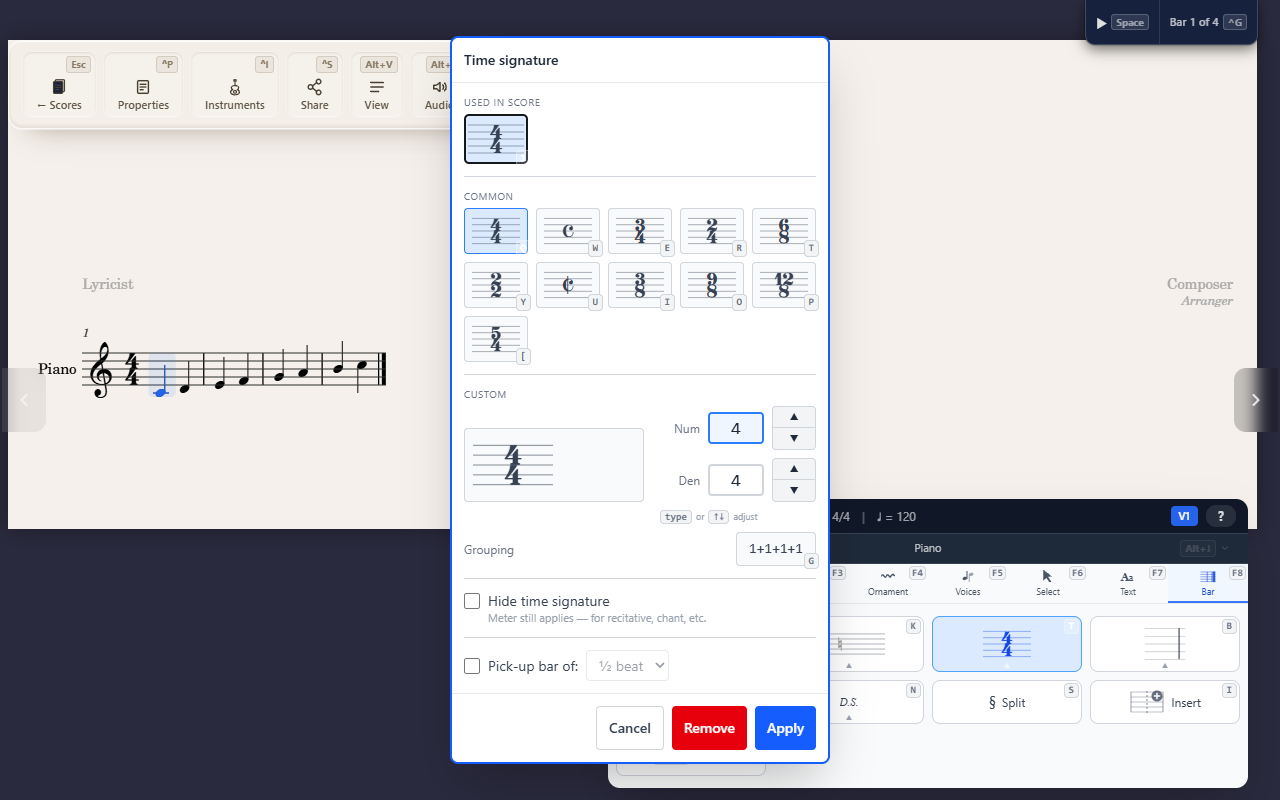
Time and key signature are both score-wide “from this point forward” settings, like a clef, but each manages its own picker rather than a two-step submenu.
Time signature
F8 T opens the time signature picker. Pick a common meter or enter a
custom numerator/denominator directly — the picker handles its own
keyboard input, so there’s no further sub-key sequence to learn.
Grouping (G in the picker) sets the beats the bar is divided into,
such as 7/8 as 3 + 2 + 2, which the notes are beamed by — see Changing
how notes are beamed.
Key signature
F8 K opens a circle-of-fifths picker for the key signature. Selecting a
key applies it from the selected measure forward, the same way a clef
change does.
A key change is drawn after the barline: naturals cancel the sharps or flats the new key drops, then the new key signature follows. When the change starts a new line, the line before ends with the naturals and the new key too.
Tips
- Both changes take effect at the selected measure and read forward until the next explicit change — see Changing clef mid-score for the same rule applied to clefs.