Barlines and repeat signs
A repeat pair needs both ends set independently — a begin-repeat on the measure that starts it, a repeat-end on the measure that ends it.
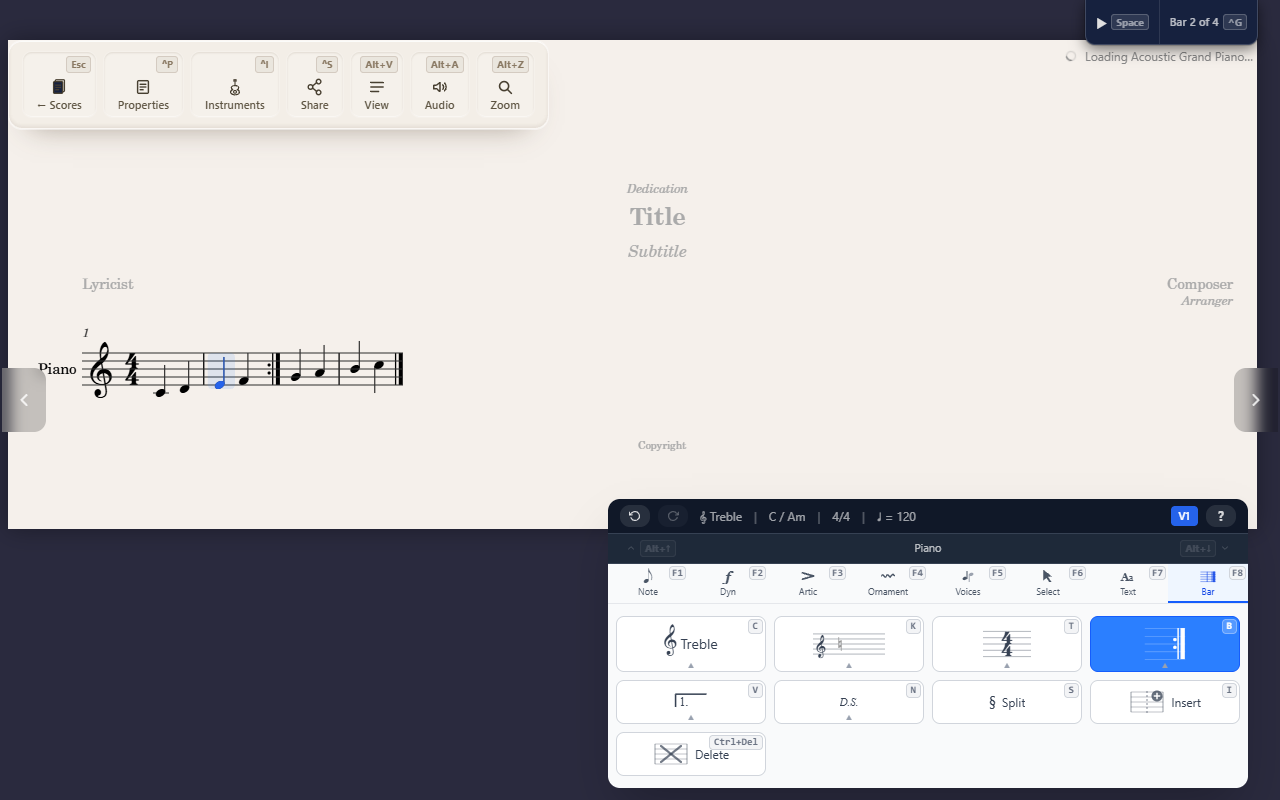
The Bar tab’s F8 B submenu sets the barline at the end of the selected
measure — including the repeat signs, which need both ends of a repeated
passage set independently.
Setting a barline
Select a measure, open F8 B, then a digit: Regular (1), None (2),
Double (3), Final (4), or Repeat End (5). Reapplying the same style
toggles it back off to Regular — there’s no separate “clear” command.
Repeat pairs need both ends
F8 B 0 toggles a begin-repeat flag on the measure that starts the
repeated passage — this is a left-side marking, separate from the
right-side styles above. Set a begin-repeat on the first measure and a
repeat-end (F8 B 5) on the last, and QuickStave draws the combined
:‖: glyph automatically where they land next to each other.
A barline change applies to every staff and part at once, so barlines stay in sync down the whole system — you never set one staff’s barline independently of the others.
Tips
- Setting or clearing a repeat-end also keeps a volta ending’s closing bracket in sync automatically, if one ends on that measure.