Grouping staves
Brackets and braces come by themselves; a group, from + Add Group in the Instruments panel, names staves together like Choir I or brackets them your own way.
Brackets and braces come by themselves, and barlines run through each bracket and break between. You don’t need a group for any of that.
In a score of ten instruments or more:
- Each section, such as the woodwind, the brass, the percussion or the strings, has a square bracket, a section of one staff too. The timpani stand apart from the percussion, with no bracket.
- A piano’s or harp’s staves are braced and barred on their own, with no square bracket.
- Like woodwind, brass or voices side by side, such as Horn 1 and Horn 2, are joined by a thin bracket inside their section’s. Violin I and Violin II are two sections, so nothing joins them.
- Two or more saxophones side by side have a bracket of their own.
- A band, with no strings but a double bass, brackets each woodwind and brass section on its own: flutes, oboes, clarinets, bassoons, saxophones, horns, trumpets and cornets, trombones, and euphoniums with tubas.
A score of two to nine instruments is a small ensemble:
- Instruments of one family share a bracket, as a string quartet’s do.
- A mixed ensemble, such as a wind quintet, has one bracket over every staff, barred through.
- Pairs of the same instrument, as in a wind octet, have a bracket for each pair.
- Where every instrument but one is of one family, as in a clarinet quintet, the family has a bracket and the other instrument none.
- Up to six instruments with a piano or another braced part, the other staves have no bracket and are barred on their own; four or more of them are barred together.
Voices share a bracket, each staff barred on its own. A soloist, such as a solo voice or a concerto’s soloist, takes no bracket and has barlines of its own (see Soloist in Adding and managing instruments). A system that shows only some of a section’s staves, even one, keeps its bracket over them, and the barline that joins the system at its left.
A group is for naming staves together, like Choir I, or bracketing them your own way.
Adding a group
In the Instruments panel (Ctrl+I), + Add Group under the list (or
G) adds an empty group. Drag instruments into its drop area by their
handle, the six dots at the start of each row, or choose Add to group
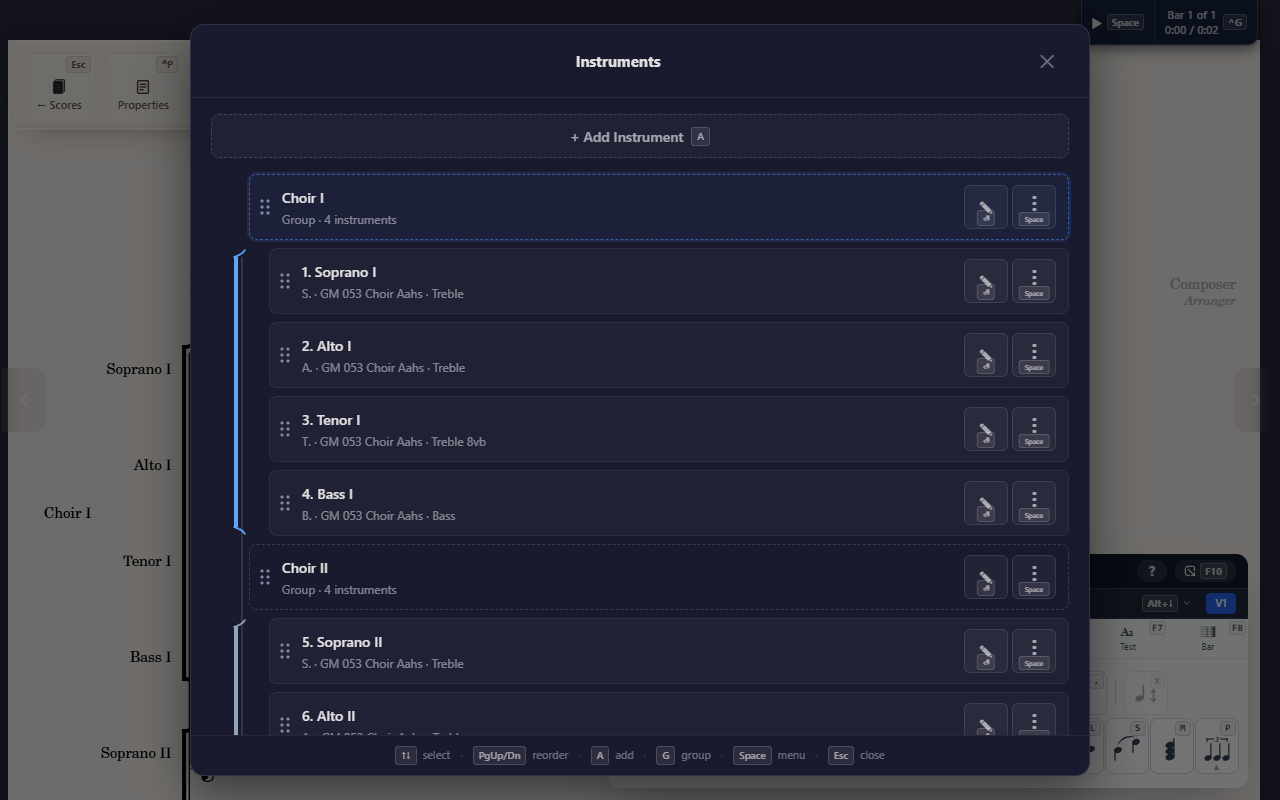
in an instrument’s ⋮ menu (Space). A group’s row shows its name and
how many instruments it holds, with its instruments indented under it.
Just below a group’s last instrument, moving the pointer a little further down chooses between the end of the group and the place after it; the dashed slot in the list shows where the instrument will land.
A group can stand inside another, one level deep: the sopranos of Choir I divided into Soprano 1 and Soprano 2, for example. Add to group lists a group inside another with the outer group’s name after it.
Edit Group
✎ on a group’s row opens Edit Group. Each choice shows a line saying what it does here.
- Name and Abbreviation: the group’s label in the margin, on the first system and on later ones. With no name, the group prints no label.
- Bracket: Automatic, Square, Thin, Brace or None. Automatic gives a group of different instruments a square bracket, parts of the same instrument or a group inside another a thin bracket, and soloists none; a group with one instrument has none until it has two. Square and None take the group’s staves out of their family’s bracket.
- Barlines: Automatic joins barlines where the brackets do, except that each singer’s staff keeps its own; Through joins every staff in the group; Each stave bars every staff on its own.
- Staff labels: Beside their names keeps each staff’s own name, with the group’s label outside them; In place, numbered centres the group’s name on its staves with 1, 2 … beside them, as divided voices are often labelled.
- Label: Across, or Up the margin, reading upwards beside the staves and taking less room.
Staff labels and Label need a name; until the group has one, their numbered and label choices are greyed.
Moving and removing
A group’s ⋮ menu moves it up or down (PgUp, PgDn) with its
instruments, or deletes it. Delete group (Del on its row) leaves its
instruments where they are, outside it; undo brings the group back. An
instrument’s ⋮ menu has Remove from the group it’s in.
In the score
Clicking a bracket or brace in the score opens the Instruments panel on its group’s row, and clicking a group’s label opens Edit Group.
Tempo markings and rehearsal marks repeat over the first staff of each group with a singer in it, so each choir of a double choir reads them above its own staves; in an orchestra they stand above the strings instead. A group of instruments doesn’t repeat them.
Choirs ready-made
Divided Choir (SSAATTBB) comes as four groups, Soprano, Alto, Tenor and Bass, each with its 1 and 2. Double Choir (SATB/SATB) comes as Choir I and Choir II, each with its own bracket and labelled on the first system.
Files
An exported MusicXML file carries every bracket and brace the score draws, so other programs draw them too, and keeps the groups for QuickStave to read back. Opening another program’s file, its named or bracketed groups that differ from the automatic brackets become groups.
Tips
- Soloists, such as Solo Soprano to Solo Bass, take no bracket. Group them, named SOLI with Label: Up the margin, to label them together.
- To bracket instruments together that their families keep apart, such as a clarinet with the strings, put them in a group: a group of different instruments takes a square bracket by itself. A band’s flutes and oboes can share a bracket this way.
- To mark a divided string part written on staves of its own, such as Violin I and its div. staff, put them in a group: a group of one instrument takes a thin bracket.