Segno, Coda, and D.S./D.C. markers
F8 N toggles Segno, Coda, and Da Capo/Dal Segno markers at a measure — playback actually jumps on them, resolving repeats and codas the way a performer would read them.
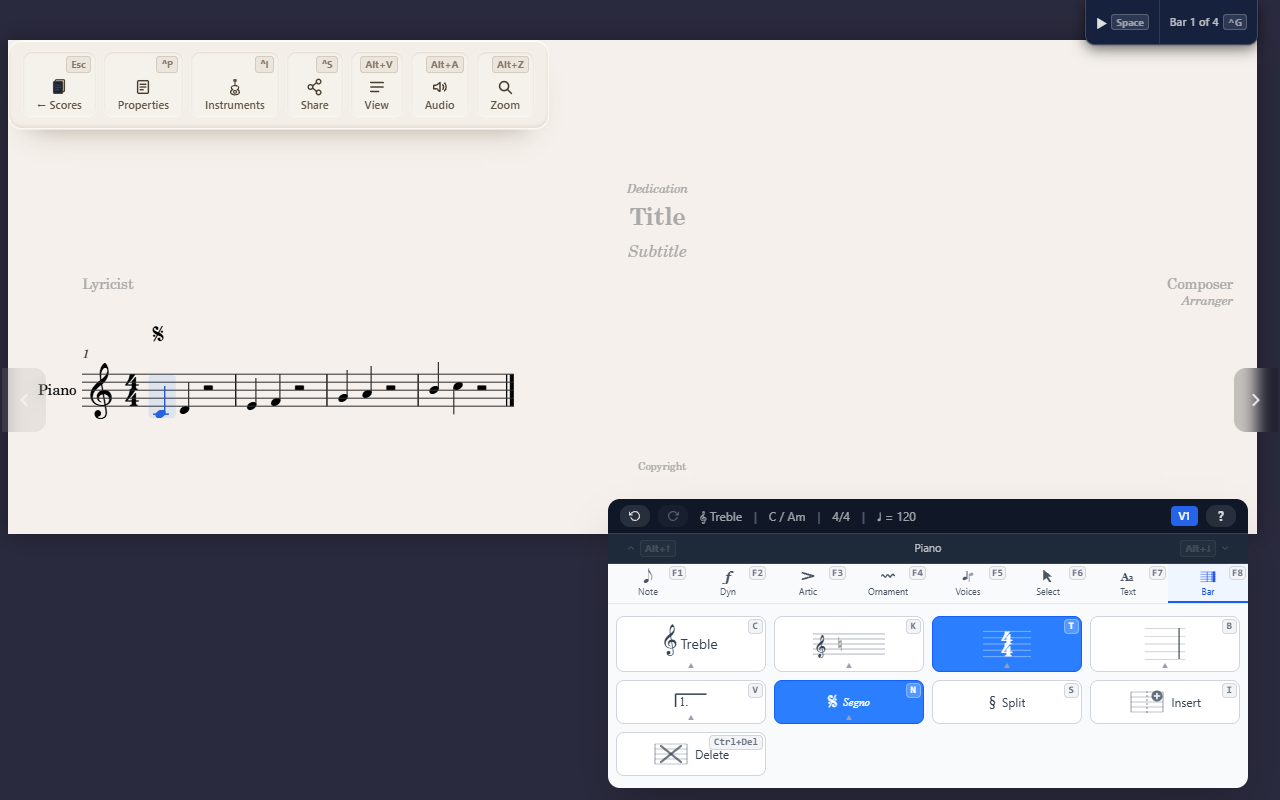
F8 N (Bar tab) toggles a playback-routing marker at the selected
measure — Segno, Coda, To Coda, Fine, D.S., D.S. al Fine, D.S. al Coda,
D.C., D.C. al Fine, or D.C. al Coda.
These aren’t just print — playback follows them
QuickStave’s playback engine resolves the real performance order from these markers together with repeat barlines and volta endings — pressing Play on a score with a D.C. al Fine genuinely jumps back to the top and stops at Fine, the way a performer reading the page would, rather than just playing straight through.
One marker per type per measure, and Segno/Coda are score-wide singletons
Re-pressing the same marker’s key on a measure that already has it removes it (a toggle). A measure can carry more than one different marker at once (e.g. a D.C. al Coda alongside a Fine on the same measure is fine), but Segno and Coda are each limited to one per score — setting a new one moves it, replacing whichever measure held the old one.
Not the same as “jump to a measure”
These are marks a performer reads during playback — they don’t help
you jump around the score while editing. For that, see Jumping to a
measure (Ctrl+G), a completely different feature that happens to share
the word “navigation.”
Tips
F8 N Delremoves every navigation mark from the selected measure in one press.