Turns, mordents, and trills
Trill, mordent, turn, and their variants are a direct one-key toggle on a note — press a key, done, the same "no end point" mechanic as articulations.
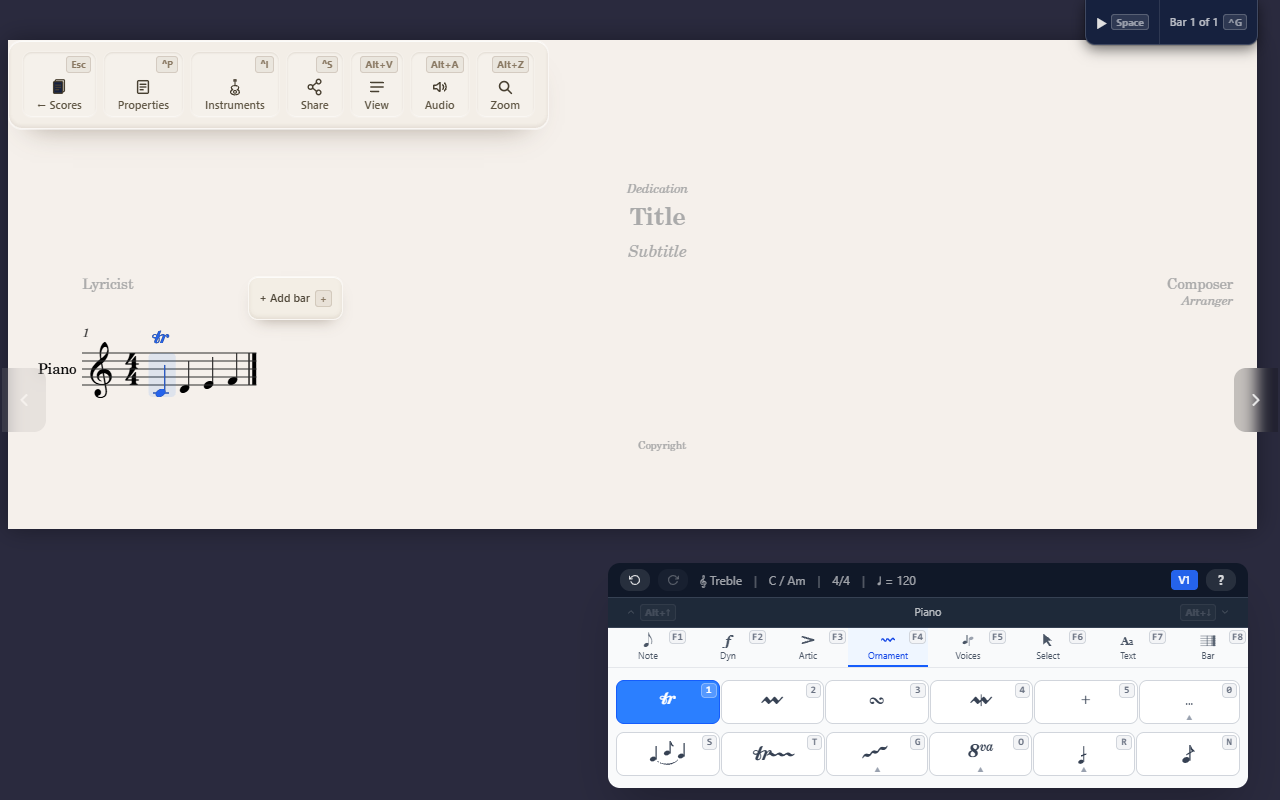
The Ornaments tab (F4) has twelve direct symbols that toggle onto a
selected note the same way an articulation does — press a key, done, with
no end point to pick.
Applying a symbol
F4 1–5 are the five primary symbols: Trill, Mordent, Turn, Inverted
mordent, Shake. F4 0 opens an overflow submenu with four more: Inverted
turn, Delayed turn, Schleifer, Haydn ornament. F4 0 S/F/N add a
sharp, flat, or natural for the ornament’s other note, when it needs an
altered pitch. The accidental stands above the symbol for a note above and
below it for a note below: below a mordent and an inverted turn, above the
others.
Trill the symbol vs. trill the line
This article is about the trill symbol — a static mark on one note. A trill line is a different thing: a spanner that stretches a wavy line across a passage, with its own start and end point. See Trill lines and octave-shift lines for that one.
Flipping above or below the staff
X moves the selected note’s ornament symbol to the other side of the
staff. If the note also starts a slur — or several, nested — X opens a
small menu first so you can pick which one moves; with only one
flippable thing there, it flips right away. Press X again to hand the
mark back to its default side (above, for a symbol; the automatic side,
for a slur) rather than pinning the opposite one, so it only carries your
override while you actually disagree with the default. Select a range
first and X flips every ornament symbol and slur starting in it, each
from its own side. See Adding slurs for slurs themselves.
Tips
- Applying a different symbol replaces whatever was there — there’s no need to clear one before setting another.
- See Entering notes for how a note gets onto the page before you ornament it.