Adding expression text
F7 E adds interpretive text like dolce or con fuoco — over 50 known terms carry a bound playback effect shown as an Effect indicator, or type freeform text with none.
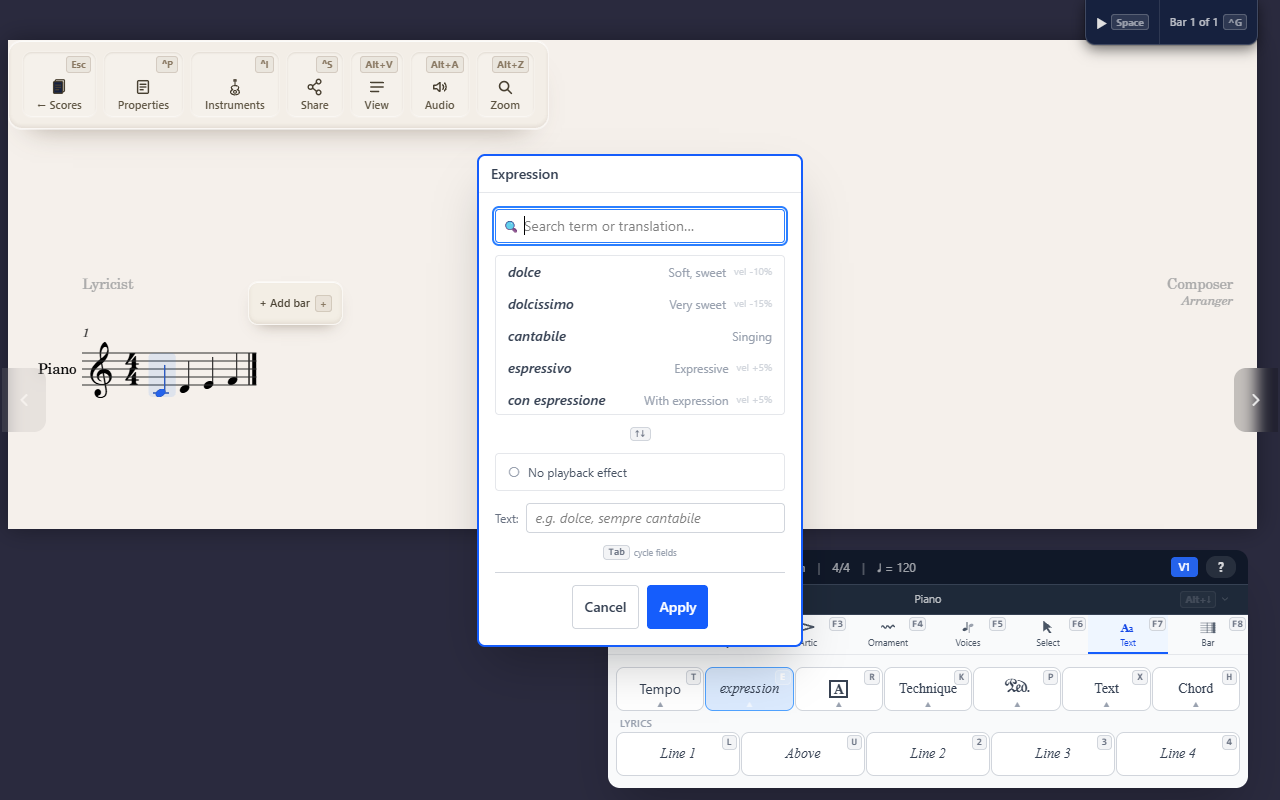
F7 E (Text tab) attaches interpretive “how to play” text — dolce, con
fuoco, and similar — at the selected note, in italic. It stands on the
dynamics’ side of the stave. At a note with a dynamic it follows the
dynamic on its line, f feroce, where there is room before the next mark;
otherwise it stands just beyond the dynamics. attacca at the last note of
a movement ends at the movement’s last barline, and sim. repeats the
expression before it.
Known terms and their playback effect
Over 50 known Italian terms are searchable in the picker; each carries a bound velocity/duration effect on playback, shown next to it as an Effect: indicator (e.g. a small volume or timing nudge). Picking one applies both the printed text and its effect together.
Editing the text afterward — say, changing “dolce” to “sempre dolce” — keeps the bound effect; it isn’t cleared just because the text changed. A Clear Effect button detaches the effect explicitly while leaving the text in place, if you want the words without the playback change.
Typing freeform text with nothing selected from the list applies with no playback effect at all — just printed words.
A line after the words
Line (None, dashed, dotted, solid) and End (None, hook, arrow) draw
a line on from the words over the notes they govern. Select the passage
first and the words go on its first note and the line runs to its last.
With one note selected, Apply leaves you to pick the last note, as for a
hairpin: move to it with the arrow keys and press Enter (see Creating
spanners). A hook turns the line’s end toward the staff; an arrow points
at what stands at its last note, such as the next instruction, which then
stands level with these words, or just after the arrow’s tip where the
words run past its note. Tab moves
between the dialog’s fields, and ←/→ changes the Line or End row that
has focus. On a later system the line carries on from the first bar.
The + and circle buttons beside the text add the brass player’s stopped and open signs to the words, at the size they stand over a note: side by side for a sudden change, or with an arrow between them for a gradual one.
Tips
- Reach for expression text for how to play (dolce, cantabile) — compare Adding tempo markings for how fast and Adding technique text for what physical technique to use (pizz., arco).