Swinging the eighths
F7 T F marks a swing, shuffle or straight feel — one marking that both prints on the page and changes how playback lands the off-beats, with the ratio set by ear.
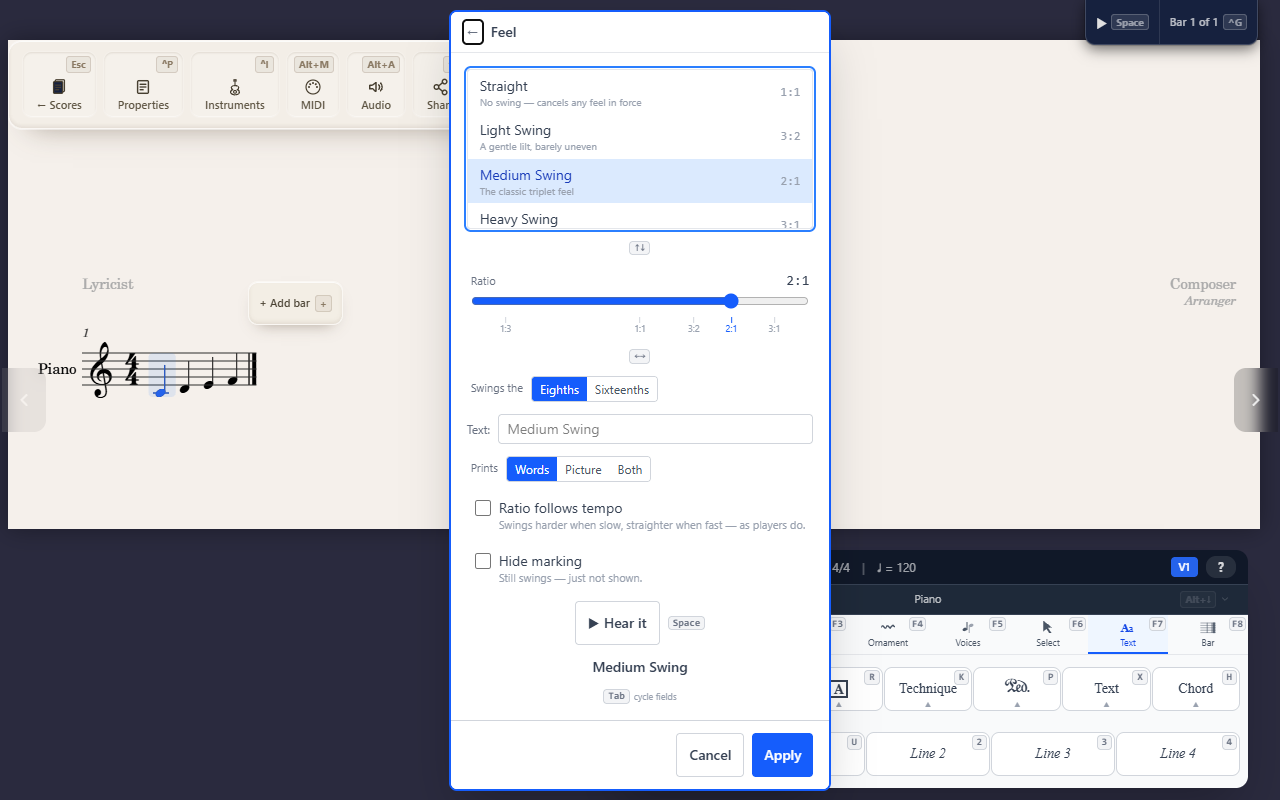
F7 T F (Text tab → Tempo → Feel) marks how the eighths are played from
that point on. It is one marking doing two jobs: the words print on the
page, and playback moves the off-beats to match. Written eighths stay
written eighths — you do not notate triplets to get a swing.
The feel holds until the next feel marking, across the whole score.
Choosing a feel
Five presets cover the usual ground:
- Straight (1:1) — even eighths. Cancels a swing already in force.
- Light Swing (3:2) — a gentle lilt, barely uneven.
- Medium Swing (2:1) — the classic triplet feel.
- Heavy Swing (3:1) — the hard dotted-eighth shuffle.
- Scotch Snap (1:3) — reversed: the short note lands on the beat.
The ratio slider below the list moves between them and stops anywhere in between, so a feel that sits between light and medium is available too. The named presets are marked along the slider; clicking one jumps to it, and the arrow keys step from preset to preset.
Hear it plays two bars at the ratio currently set, at the tempo in force, so you can pick the feel by ear before applying it.
What swings
Swings the chooses the layer: Eighths is the usual jazz feel; Sixteenths swings the sixteenths against the eighth, for funk and shuffle-feel grooves.
Notes shorter than the swung unit move with the half they sit in, keeping their proportions — a swung eighth written as two sixteenths still lands inside the shortened half. A written triplet plays straight, because its timing is already spelled out on the page.
What prints
Text overrides the words. Leave it empty to print the preset’s own name, or type your own (“Medium Up”, “Shuffle feel”).
Prints chooses the form:
- Words — the marking as text, e.g. Medium Swing.
- Picture — the engraved equation: two beamed eighths equalling a quarter and an eighth under a triplet bracket.
- Both — the words with the equation in brackets after them.
The picture is available for the ratios players write out — the triplet swing, the hard shuffle and the Scotch snap. For other ratios it is greyed out and the marking prints its words.
Hide marking keeps the swing in playback without printing anything, for a chart that should sound swung without saying so.
When the feel sits on the same note as a tempo, they print as one line — Medium Swing ♩ = 132.
Ratio follows tempo
Players swing harder at slow tempos and straighter at fast ones. Switch Ratio follows tempo on and QuickStave does the same: a 2:1 marking plays nearer 2.5:1 at a ballad tempo and nearer 1.5:1 at a fast one, and straightens out entirely when the tempo leaves no room for an uneven pair.
The written tempo is what the curve reads, so slowing playback down in the mixer to practise gives you the same feel, just slower.
Removing
Remove deletes the marking, and whatever feel was in force before it carries on. That is not the same as marking the passage Straight, which is a marking in its own right that cancels the swing from that point.
Imported scores
Files from other applications usually say “Swing” in words and leave the playing to the reader. QuickStave reads those words and adds a real feel marking on import, so an imported chart swings rather than playing straight. The marking is an ordinary one: edit it, or delete it, as you would your own.
Tips
- Swing and MIDI or audio export agree — what you hear is what exports.
F7 T Xremoves a tempo; the Feel panel’s own Remove button removes a feel.