Guitar tablature
TAB is a view of the same notes, not separate data — one part, two synced staves, with a Tab Display toggle controlling which staff or staves actually show.
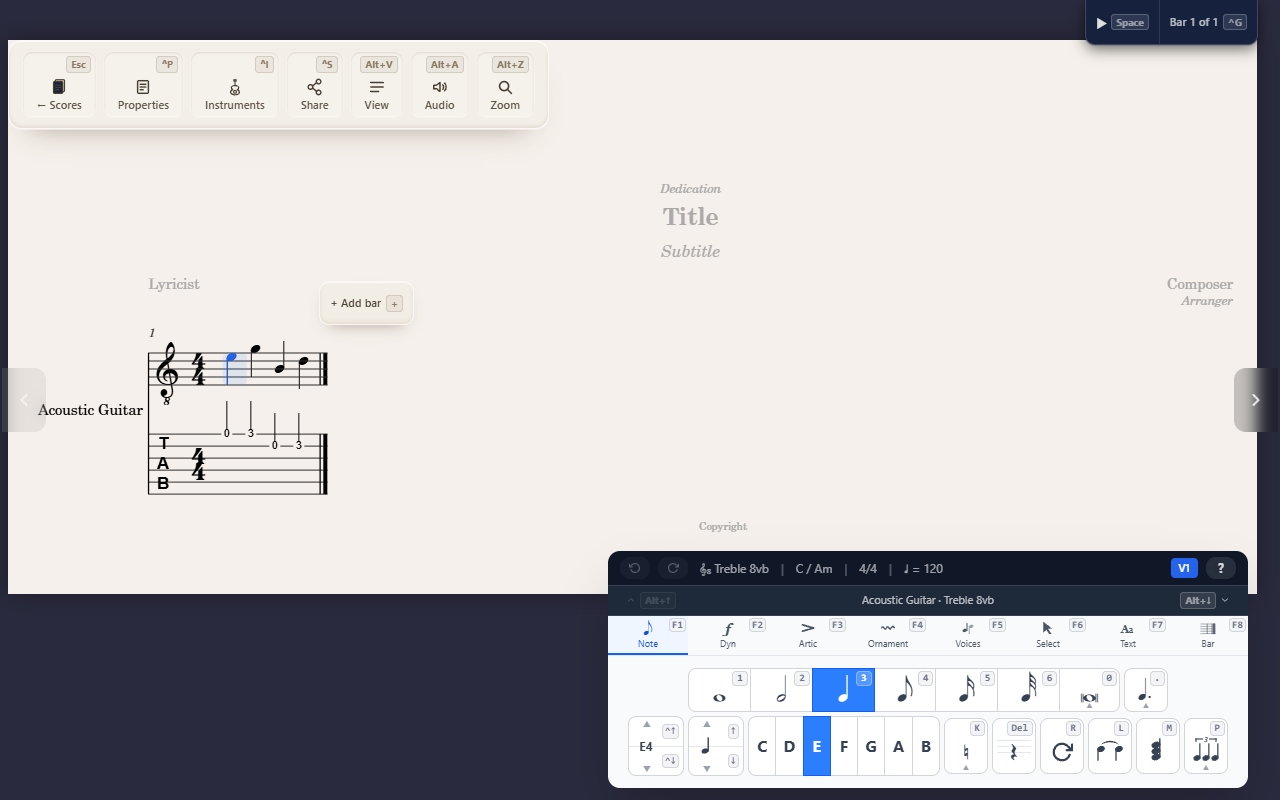
A TAB staff isn’t a second copy of your music — it’s the same notes, shown a different way. One part, two staves (standard notation and TAB) sharing the same events; edit either one and both update.
Controlling which staff shows
The fretted instrument’s Tab Display setting (Instruments panel) is a three-way toggle:
- Linked — both staves, kept in sync.
- Tab Only — just the fret numbers, for a “give me tab and nothing else” workflow.
- Notation Only — hides TAB, keeps standard notation.
Switching preserves the underlying notes either way — nothing is lost toggling between them.
Fret assignment
A note’s string/fret is auto-computed on entry (the lowest playable fret
is preferred). Override it with ↑/↓ while your cursor sits on the TAB
staff — this moves the same pitch to a different string, not a different
note — or type a fret number directly onto the TAB staff.
Tuning, capo, and style
Tuning and capo are real per-instrument settings — Standard, Drop D, DADGAD, Open G/D/E, half/full-step down, Open C, plus bass/ukulele/banjo/ mandolin defaults, with capo shifting the effective fret. Tab Style is Simple or Rhythmic (just these two ship today).
Tips
- The bend/slide/let-ring/palm-mute/vibrato technique marks (see Bowing and guitar technique marks) render only on the TAB staff — never on standard notation, even when both staves are visible.
- Bends and slides are visual notation only today — there’s no audible pitch-bend on playback yet.
- No fretboard/chord diagrams, harmonics notation, or whammy-bar notation yet.