Writing harp pedals
On a harp, F7 P opens the pedal bar — set each of the seven pedals to flat, natural or sharp, written as names or as the pedal diagram.
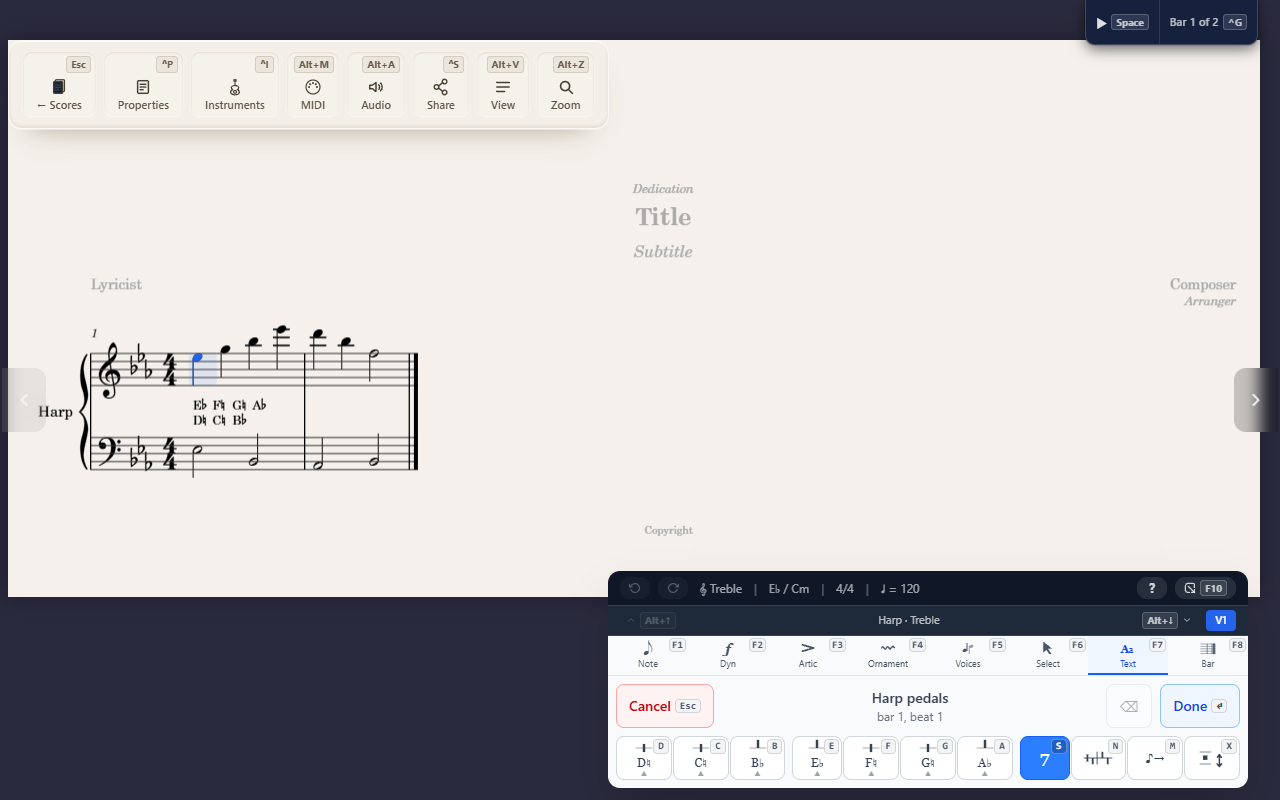
A harp has seven pedals, one for each letter name, and each sets that letter’s strings flat, natural or sharp. A pedal mark tells the harpist how to set them from that note on.
Opening the pedal bar
On a harp, the Text tab’s pedal button shows the pedal diagram and reads
Harp pedals. F7 P, or Harp Pedals… in the command palette, opens
the pedal bar in place of the tab, for the note or rest at the cursor. An
empty bar can take a mark too. Clicking a pedal mark in the score opens the
bar on it. A harp has no damper pedal, so the piano’s pedals aren’t offered
there.
The bar opens on the setting in force at the cursor: the key signature’s, changed by each pedal mark before it in the part. Its title says where the mark stands, such as bar 3, beat 2. While it’s open, the keys are the bar’s, and the cursor stays on the mark’s note.
Setting a pedal
The seven pedals are in the harpist’s order: the left foot’s D, C and B, then the right foot’s E, F, G and A. Each shows its position and its name.
Tap a pedal, or press its letter, and its chooser opens above it: ♭, ♮ and
♯, with the position set now lit. Choose one and the chooser closes. In the
chooser, ↑ is ♭ and ↓ is ♯, the way the pedal moves, and the letter
again is ♮, so B then ↑ sets B♭. Escape closes the chooser and leaves
the pedal as it was.
A pedal moved from the setting before the mark lights up: the mark writes it.
All seven, Diagram, From the notes and Flip
S— All seven: the mark writes the complete setting, not only the pedals that change. It’s on at the part’s first mark and off at later ones; press it to switch it either way.N— Diagram: draws the complete setting as the pedal diagram, a line with a notch for each pedal: above the line for ♭, through it for ♮, below it for ♯. The left foot’s three come first, then a divider, then the right foot’s four. It’s available with All seven on.M— From the notes: sets each pedal for the notes written from the mark to the next one, on either staff. A letter written two ways, such as F and F♯, or with a double sharp or double flat, is left as it was and shown red.X— Flip: puts the mark outside the system, and back. Greyed on a harp with one staff.
Done (Enter) writes the mark as one step, undone as one. Cancel
(Escape) closes the bar and leaves the score as it was. ⌫
(Backspace) takes the mark off the note. Until you press Done, the mark
is drawn in the score as you set it.
Where a pedal mark goes
A pedal mark stands between the harp’s staves, starting at its note, and the staves move apart to make room for it. Names are written in columns, the right foot’s pedals above the left foot’s: E over D, F over C, G over B, with A alone at the end. A change for one foot takes one line.
Flipped outside the system, a complete setting goes above the top staff and a change below the bottom one. On a harp with one staff, a complete setting goes above it and a change below it.
Playback
A pedal mark isn’t heard itself, but a glissando on a harp plays the strings as the pedals are set where it starts. Before the first pedal mark, they’re set by the key signature.
Tips
- MusicXML keeps a pedal diagram as a diagram. Names go out as words, which QuickStave reads back as the mark, and pedal names another program writes as words on a harp come in as pedal marks.