Using the audio mixer
Alt+A opens the per-part mixer — volume, pan, reverb send, mute, and solo for every instrument, plus a master strip, saved with the score.
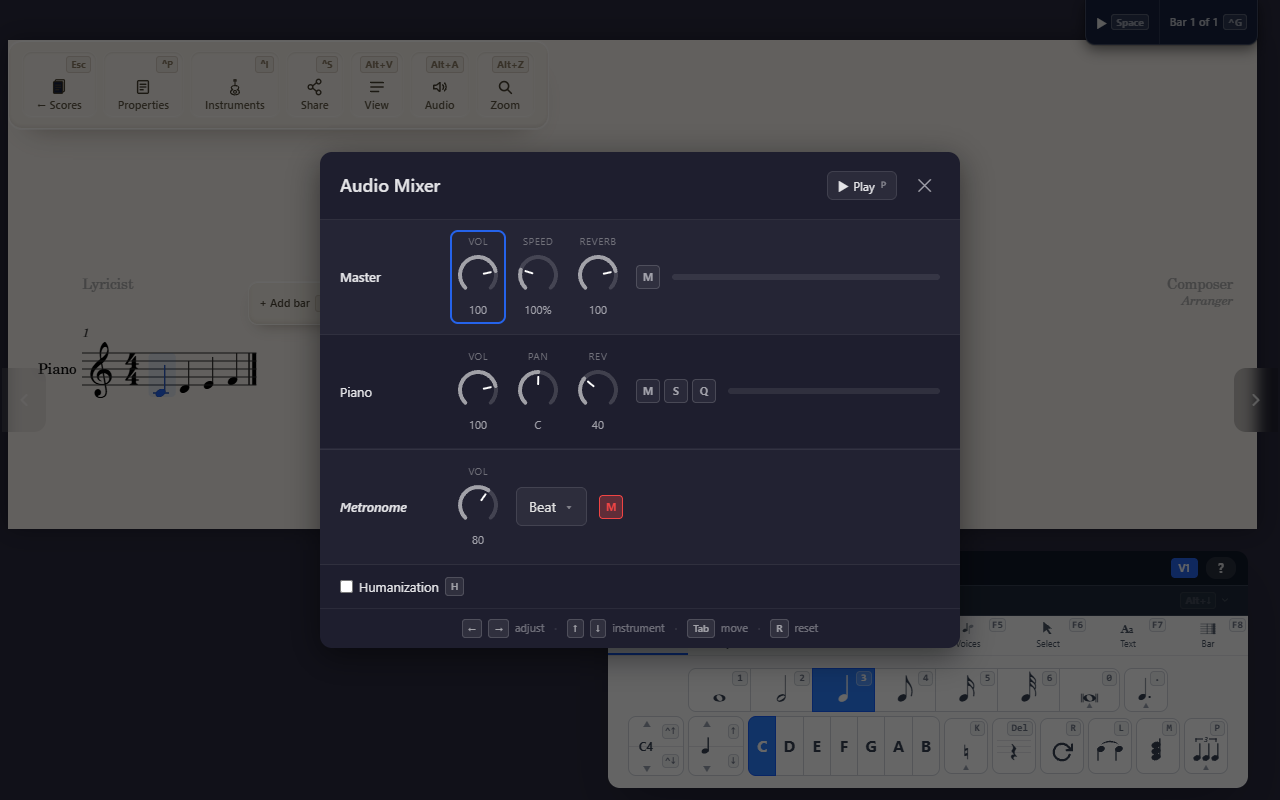
Alt+A opens the audio mixer — one channel strip per instrument in the
score, plus a master strip and a metronome strip.
Per-instrument controls
Each part gets its own Volume, Pan, and Reverb send knobs, a Mute toggle, a Solo toggle, and a “Quiet others” toggle. Soloing isn’t exclusive — solo more than one part at once and every non-soloed part is silenced, while the soloed ones play normally.
Master strip and metronome
A separate master strip controls overall Volume, playback Speed, and Reverb, and has its own Mute — independent of any individual part’s settings. A metronome strip sits alongside the instrument channels, with its own Volume, a click-subdivision picker, and Mute.
A Humanization checkbox (H) below the channels adds subtle timing
and velocity variation to playback, for a less mechanically-precise feel.
Persistence
Mixer settings save with the score (auto-saved and cloud-synced), so they come back the way you left them next time you open it. They’re deliberately not part of undo/redo — a mixer tweak won’t get swept away by undoing an unrelated edit, and undoing won’t revert your mix.
Tips
- Add or remove instruments from the Instruments panel (
Ctrl+I) — the mixer always reflects whatever’s currently in the score.